Search

eLearning Frenzy

eLearning is like a sewer, what you get out of it depends on what you put into it.

Month

July 2016

BbWorld16 Session Blog – General Session 1

Unveiling Blackboard’s Latest Developments  Ballroom 3:30 – 5pm

  1. Your Needs challenges and opportunities
  2. Uniquely addressing needs
  3. Committement to fundamentals

Challenges
k12 – engaging families to improve student achievement, different funding models
higher ed – enrollment, retention, ROI, post traditional learner
corporate – addressing skills gap
all of these are different and unique..needs are evolving and changing over time.

Blackboard addressing uniquely – Helping Students Succeed

  • Deliver thoughtful and relavent info across portfolio
  • Breadth and broad reach of portfolio 19k customers, 100 million users, 100 countries
  • Deep insights about world of learner – listening to you, looking at datasets, understanding our users, convert insights into innovations

New Products – Blackboard Planner, Blackboard Advise, Blackboard Predict
Investing 350million dollars into innovation of core teaching and learning products and rest of Blackboard’s Portfolio.

Commitment to Fundamentals

  • Develop and Deliver – established total transparency from scrum teams to Board of Directors (visibility into product development activities), consolidation of strategy, marketing.
  • Support Customers – (operational excellence and improving customer experience).
  • Innovate – investing in innovation at scale…partner that meets your evolving needs
  • Communicate – clear, open and regular communication and that includes listening.


Product Strategy

Portfolio capabilities – learner interacts with admin, support staff, counselors, employers, advisors, classmates, teachers/faculty, parents

Core of student success mission is driving learning outcomes.  Core of Blackboard portfolio is Teaching and Learning products.    2 most prevalent LMSs – Blackboard & Moodlerooms.

Embedded learning analytics, world class collaboration and mobile tools are also part of portfolio.

K12 – parental and community involvement is fundamental to drive student success.

Solution Set of student lifecycle services – Student Account Support, Helpdesk support, retention and enrollment services.

Powerful Insights – Community input, data science and empathetic research

Community of Input – that’s us 19k customers a community of practice, surveys, technical previews, customer research groups, innovative teaching series.

Data Science – John Whittmer “Dr. John” -7 tb of learning data, 1,200 institutions, 35m learners and teachers, 7m courses, 2.7billion Lms sessions – Looking at specific research questions and/or broad trends.  Blackboard doesn’t own data…this is our data.

Collaborate Data – Engagement Metric (across, chat, audio, video, app share) Students can get engagement score.  Session engagement timeline.

Empathetic Research – Matt Franks – We are taking a user-centered approach in designing our emergent products.  Understanding what people do and why do they do it?

Activity Stream – entry point for students in Bb Student and Ultra (came from empathetic research of students.

1 Learn, 2 Experiences, 3 Deployments

Shared code, ultra and 9.1, self-hosted, managed hosted, SaaS

Roadmap – Where we are

  • Quality – hundreds of bug fixes, updated tech, unified code and simplified releases
  • Enhancements – CBE
  • Mobile Support – Bb Student available to all customers, expired by ultra experience avialable now

What’s next with Original Experience of Learn

  • Attendance Record (track attendance within learn – optional provide a grade and export)
  • API Dev Portal – Restful APIs available

What’s next with Ultra Experience of Learn

  • Educator Preview (preview.blackboard.com)
  • updates on Ultra
    bbultra
  • granularity of control of ultra adoption


BbWorld16 – Building student connections when teaching high enrollment online courses.

student_connectionsVenetian H
Tuesday 7/12 @ 1-1:50pm

Jody Lester, Associate Professor
Boise State University

Connect students with course and the online environment
Week Zero: Do not assume students will already know how to learn online.  Welcome them to the experience.  Create a warm, supportive environment where they can learn.

  • Direct them to Blackboard Help Documentation for students
  • Send an introductory e-mail through blackboard before class begins.
  • Include a short 5 minute or less video introduction that introduces you and the class, setting a positive tone.
  • Let students know when the course will open (first day of class) and when their first assignment will be posted/due.

Make the course site easy to navigate:

  • Keep the navigation elements simple
  • Use sub-header and divider elements to visually organize the course menu items
  • Use a course banner

Establish predictable patterns: For the student, an established pattern of course activities allows for planning and management of other non-course activities around their online activities.  For the instructor, establishing and communicating a course schedule and pattern of work serves to define the boundaries between the online class and the rest of life.

  • Clearly label content areas, folders and identify the reasons for assignments
  • Provide a checklist for each assignment so that students can clearly identify whether they have completed all the required work (rubric)

Connect the instructor to the students and students to the instructor
Create a “we are in this together” atmosphere:

  • Thank students for questions/suggestions, empower them to help improve the online experience in the course (maybe a survey)
  • Acknowledge that life happens and consider awarding one “late pass” over the semester.
  • Include “what’s in it for me” information in the introductory e-mail.

Get to know students individually and recognize them individually:

  • Have students post about themselves in discussion board/blog posts/introductory activity.
  • Post personal feedback to each student after their introduction.
  • Create a “goes by” interesting tidbits column in the gradebook
  • Keep notes that help you remember each learner’s interests, experience.
  • Construct answer keys/feedback documents that use student answers
  • Name Names: publicly praise exemplary work.  Send personal e-mails, recognizing great work or offering support
  • Sort the “last access” column in the gradebook and send out “I see you working” or “I wonder what’s up” emails
  • One on one communication – individual feedback
  • Sort using ascending and descending feature in Bb Gradebook to send out “I bet you didn’t earn the grade you expected” or “Way to go!” e-mails.
  • Use the “grade questions” option in the gradebook – grade and create feedback/answer key
  • Use “grade history” option to re-use common statements
  • Keep a record of individual contacts-column in the gradebook

Let students get to know you

  • Set the tone with your personal intro
  •  Use video – let them see you
  • Keep it real-we are fallible.  Don’t spend hours re-recording videos if there are minor errors.
  • Post interesting info about your University and your community.

Connect students to other students:

  • Form small groups to build a sense of community
  • Have a clear purpose for group projects
  • Use group tools such as file share, collaborate, email, discussion board
  • Be creative – journal club or group meetings using collaborate

Connect students to the content:

  • Really think about how the Bb assignment and test tools can be used and about how assignments can be modified when used with high enrollment courses.
  • Have Bb grade when possible but consider using at least one instructor graded item for each assignment.
  • Create relevant assignments (focus on learning, not superficial (busy work) activities: Strive to create effective and efficient teaching and learning experiences.
  • Create rubrics for assignments – student can then use rubric as checklist to ensure that assignment is complete and in some cases determine their grade.
  • Don’t reinvent the wheel, link to quality resources.  Encourage students to send you links to sites/material they found helpful.
  • Re-use where possible.  Use the “copy” options to copy assignments from one course to another
  • Teach students (video or screen capture) how to see if their assignment was received and how they can view feedback.
  • Post video instructions for various assignments to increase engagement – discuss the previous week, discuss the current assignment and include tips for success.
  • Streamline feedback – use audio/video feedback group answer keys, encourage personal responsibility for checking grades.  Set and publish thresholds for receiving individual feedback.  Use feedback templates.
  • Use the feedback sections in tests to provide feedback – consider including occasional extra credit points
  • Change it up but don’t add several new things at once – remember predictable patterns help
  • Save examples of excellent student work from a previous semester (get their permission to use) so students can see what the assignment might look like.

Take Notes: Over the semester, note what worked well, what needs changes and identify “time drains”; plan ways for dealing with these.  Refining course management should be a continual work in progress.

Packing your Bags for BbWorld16?

When we think of thought leading eLearning conferences that we attend like Blackboard World, we often think of them in terms of things we will come back with. There is good reason for this, as there are so many takeaways that a conference like Blackboard World provides. For the purposes of this blog post however, we will be focusing on what we should bring with us to Blackboard World 2016.

So when you pack your bags for BbWorld….

…..Pack a way to share what you learn:

For every oSharing Gadgetsne of us who are fortunate enough to attend this tremendous eLearning event, there are many, many more of us who cannot be at BbWorld. Since we all know that “sharing is caring,” bring a way to share what you’ve learned with your coworkers back home and your colleagues across the world. Whether you are live tweeting by phone or mobile device, live-blogging from your tablet or laptop, or maybe just taking notes to present, blog, or post later, you will be helping your coworkers at home and your peers across academia benefit from what you are picking up from colleagues, professionals and thought leaders.

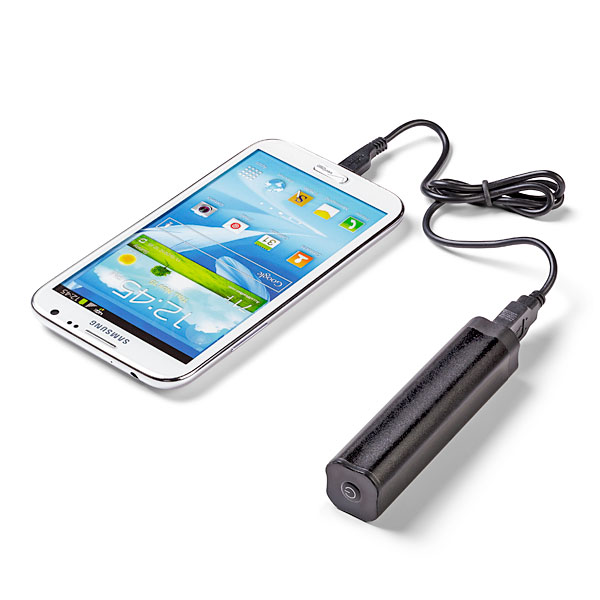
…..Pack a charger (Mobile or otherwise):

Portable ChargerIf indeed you are sharing your experience, or just trying to stay in touch with events back at home, you will definitely need a charger. I would suggest bringing one of the mobile chargers that you can keep in your pocket/purse/backpack. During the hectic schedule, you may not get a chance to go back to your room, and you may not find an open plug where you can “juice-up”. *As an addendum to this packing tip, bringing a small power strip is also beneficial as you can share one plug with a number of your peers.

…..Pack a desire to meet people and make connections:

Make ConnectionsPossibly the biggest benefit to being at Blackboard World is the ability to meet your peers and form connections that you will maintain and use throughout your professional career. At your home institution you may be the only person who does what you do, but at Blackboard World you are a small fish in a big pond. There will literally be hundreds of people with your same type of job. What better way to pick up best practices and learn what is working and not working for your colleagues, so that you aren’t stumbling around on your own when it comes to your learning management system or eLearning in general.

…..Pack some tennis shoes or at least comfy dress shoes:

ShoesBbWorld has possibly the largest population of slacks/skirts and Nikes in the eLearning universe. For a conference this large, you may be walking a quarter of a mile just to get to your next session. You also have vendors to see and colleagues to touch base with, so comfortable footwear is a must. Some of you may spend the evening at Freemont. Let me speak from experience, walking the strip + the hotel can cause blisters in the wrong shoes!

Looking forward to seeing everyone there!

Blog at WordPress.com.

Up ↑