Search

eLearning Frenzy

eLearning is like a sewer, what you get out of it depends on what you put into it.

Tag

Blackboard

BbWorld Blog: Wikis, Blogs, Forums, Journals- Which One Do I Use & Why?

7/12/2012 | Room 276

Deborah Prickett
English Instructor
Jacksonville State University

Rewrote mission statement to be a “learning centered” university.   Doing a lot of challenge based learning in the English Department.  Offering many hybrid courses.

Forums:

  • Prompts or not
  • Replies when required
  • Checking for posts that respond
  • Students – not continuous Engagement
  • Grading Fast and easy

Discussion forum keeps track of all comments(replies) in Gradebook.  Blackboard Blogs & Wikis do not.

Blogs:

Individual Blackboard Blogs are better Chunked.  Put them together so that they are easier to grade.  This professor created an individual blog for every chapter.  Great for multimedia input (videos, pictures, charts etc).  Great for older students.

Students are used to looking at blogs.  Blogs are more visual.  Forums have Tree Structure.

*Tip:  Have your students decide how the assignment will be graded: A student created Rubric!

Bb World Blog: Rubrics – Why and How to Best Use Rubrics in Blackboard

7/12/2012 | 8:30am

Subject: Learn the benefits of using Blackboard Learn’s interactive Rubrics.  This presentation will also include how-to instructions and some best practices.

Objectives

  • Define academic rubric
  • pros and cons
  • learn how to use
  • best practices and pitfalls

We are using clickers to see where we wall stand on grading and rubrics.  Great concept!

Rubric
Any established mode of conduct or procedure; protocol.

Academic Rubric
Explicit set of criteria that’s used for assessing students’ work.

Pros of a Rubric

  • promotes consistent, accurate and fair descriptive assessment
  • Promotes self-reflection and self-assessment in students (leads to higher quality work)
  • Enables comparison of works across settings (use criteria in several assignments throughout the year to help assess progress in how they are doing to achieve goals)
  • Rubrics reduce need for clarification. (Time Savers)
  • Promotes Formative Assessment

What does a rubric look like?
Holistic Rubric – applies to the whole of the assignment. Not broken down by criteria.

General Rubric – Contains criteria that are general across all tasks.  Clarity of Description 35% Opinions %35 References %10 Structure/Gammer %25

Analytic Rubric – Breaks assignment down by criteria along several dimensions.  Puts it into specific things you want the student to do.

Cons of a Rubric

  • Too specific, too detail oriented (easy for this to happen)
  • Not appropriate for all situations (algebra for example – calculate correctly or not)
  • Time Consuming
  • Do not capture complexity and creativity of some works

Steps to create Rubric

  • Dtermine learning outcomes
  • keep it short 4-15 items
  • each rubric should focus on a different skill
  • Focus on how students express learning
  • Evaluate only measurable criteria
  • reevaluate the rubric

Building Rubrics:

  • Ctrl Panel > Course Tools > Rubrics > Create Rubric
  • Supply Name and Description
  • Complete Rubric details (columns are levels of achievement and rows are criteria)

Rubrics can be exported and imported through Blackboard.

Adding Rubric to Assignment:

  • Go to assignment > Edit
  • Section 3 – Add Rubric (select rubric, create new rubric, create from existing)
  • Select the Rubric(s) you created and want to use
  • Set points from Rubric to points from assignment (only works for Points based rubrics)
  • Click OK
  • You can then delete, view and edit rubric as well as change type (grading, secondary eval), show rubric to students (make sure to say “yes with rubric scores”)

Grading with rubric

  • Grade Center
  • Go to assignment
  • find student Grade attempt
  • Click View Rubric Button
  • Check the appropriate check box for what the student accomplished in terms of levels and criteria
  • You can give feedback on specific criteria
  • Points are automatically totaled

Get the impersonate student building block from Oscelot.

Student – goes to My Grades > View Rubric

BbWorld Blog: HuMBUG without the Bah!

7/11/2012 3:50pm | Digital Content and Upgrade Center

Subject: How are large metropolitan area works together to Improve the Blackboard Experience for their Students.

John Lane – Univ of Houston Downtown

Joan Talbot – Houston Baptist University

Paul Lee from Lee College

Martha S from San Jacinto College

  • Generated list of all universities and community colleges and called & e-mailed
  • Started Listsserv using Google Groups
  • Started website after first Meeting (hosted by St. Thomas)
  • Quarterly meeitngs at different sites since.

Brainstorming sessions at meetings
Recruit new Members
Vendor Invitations for show and tells
Breakout sessions for server administration and GUI administration when possible
Discussions about what we’re doing and or current problems. Just Sharing
Lunch!
humbugonline.org

Be Open
Everyone’s opinion counts
Helpful
– if you have experienced something, share so no repeat mistakes or re-inventing the wheelReady to Share
Vendor Representations to offer insights and information

Less time figuring out things on your own.
less frustration – you have friends to call
Less Money
– Hours Spent
– Training with the Eperts
New Connections
– New Resources
– Collective Thinking
– Unlimited possibilities

Network, Seek out Bb Administrators in your geographical area!

BbWorld Blog: New Ways of Communicating at Xavier University

7/11/12 1:50pm

Subject:  Implementation and uses of Connect to communicate on campus.

Moving from just using connect for emergency communication to using it for alumni, financial aid, student activities etc.

Test messages to cell phones, PDAs networked digital signage, and other text based devices and messages to e-mail accounts.  Personalized voice messages to land line and cell phone.

Issue:

Only issue was collecting required data (cell phone number).  Had students fill out survey with cell phone and alternate e-mail address.

Bursar’s office use:
Registration – Notify students to pay for classes before they are dropped.

Refund Checks -Notify students receiving refunds.

Bills – Notify students via text and e-mail on bills.

Financial Aid office Use:

Acceptance – Notify students to accept financial aid awards
Verification forms – Notify students to complete before aid is awarded
Attendance: Attend all classes before aid is posted.

Faculty Use: Faculty schedules, attendance codes

Department Use: Notify students on meetings and seminars.

Scholarship Use: Notify students when scholarships are available.

Newsletter Use: Alumni newsletter

Social event Use: Notify alumni in certain areas of regional events.

Fundraising use: remind pledger about pledge and due date

Create a data file (.csv or .txt) of the constituents you want to communicate with and send the message just to them!

You can get information (data) about all of your communication (sent, people reached, bad numbers and successful deliveries)

Generate reports can be generated from the data.

BbWorld Blog: ConnectYard and University of Mississippi

BbWorld Blog: Engagement, Persistence and Retention:  How is the University of Southern Mississippi using ConnectYard to Successfully Enhance these Key Factors

Room 277
Tuesday 7/10/2012

Overall Concept: How Student Engagement and Persistence has a positive effect on retention.

Students and faculty choose course by course what channels they want to be communicated through.  (Facebook Twitter, Texting and e-mail)

Faculty doesn’t have to have a Facebook or twitter account to use ConnectYard for the students in their courses.

  • Social Media plays an important part in students’ lives.
  • U of M’s adoption of ConnectYard grew from a desire to improve communication and increase participation in online courses and enhance student learning.
  • Campus email is not an effective tool for student communication.

Hurdles:

– Marketing

– Faculty and Student buy-in

  • Fear that professors will have to access FB pages
  • Faculty concerned with added workload

Social Media Policy (prohibits faculty from using it to teach classes through facebook, but they can use it to supplement.)

Faculty/Student Buy-in

  • Easy to use
  • Building block Integration
  • Bridge to Social Media

Position ConnectYard

  • Integral part to each course
  • Stress privacy protection

Encourage students to personalize notifications

Stress Use to Quantify Class Participation.

Current use of ConnectYard

Getting Everyone Involved

  • Faculty to Student
  • Student to Faculty
  • Student to Student

Communication within Courses

Student Notification

How it works: Messages, Discussions and Announcements come through Channels (Twitter, Facebook, Text & e-mail).  Gradebook updates coming.

Planned uses:

  • Enhance Hybrid courses & supplementals
  • Communication/interaction tool between learning teams
  • Back Channeling during course and web presentations (students communicating with each other during lecture/video etc)
  • Intra-department interaction & communication
  • Campus Notifications
  • Student Services
  • Marketing & Recruitment

Personalize Channels

  • personal perferences
  • protect privacy

One way & Two Way Communication
Bb Integration

  • Discussion Boards
  • Announcments
  • Messages (Blogs, Wikis and Grades coming)

Participation Points
Granular Administration

Why I want to be a VIP BbWorld Blogger

CommunitySo if you’re reading this, you may be asking yourself “Why does this guy want to be a VIP BbWorld Blogger?”  This could be because you honestly want to know, or you just may be reading the title of my Blog post out loud. Regardless of why you are asking yourself that question (or just reading), I’ll tell you in one word… Community.

My name is Jacob Spradlin, I am the Assistant Director of Training and Development for the department that handles Distance Education at Sam Houston State University in Huntsville Texas.  I hold a Master’s in Instructional Technology and have over 15 years experience in the field.  I have worked with Blackboard in one form or another since 2000.   My current job involves online course development as well as training for faculty here at SHSU.

For a long time, (I believe that 1 eLearning year is like 7 regular years) I have been interested in building community on my campus when it comes to eLearning.  I started our first local Blackboard users group back in the early double oughts and learned first-hand how powerful it was to put people together so they can learn from each other.  Getting 2 English faculty in same room or even cross-pollinating the disciplines lead to wonderful discussions and discoveries.

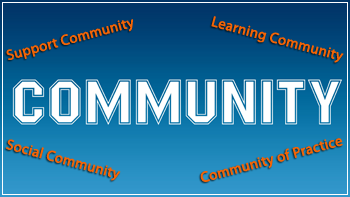
After a while longer in the game I’ve come to the determination that their are four major communities at work in eLearning:

  • Learning Communities
  • Support Communities
  • Social Communities
  • Communities of Practice

Your Learning Community is the obvious choice in that you try to make your course(s) a community of learning.  You might think of it as the “Guide on the Side on Steroids”, where your students with equal parts professor interaction, feedback and prompting; interact with each other, reflect and build upon the knowledge and skills that they are learning.

The Support Community is now almost the gold standard for eLearning, where you use the Tool to support the tool.  Whether it is a Faculty Resource course or a Student Orientation course, you leverage the technology so that they practice using it to find the answers they need.  Our most recent accomplishment at my institution is the beginnings of an Online Certification process where the faculty use the online tools to learn and become certified to teach online.

Social (insert concept here) seems to be the buzzword these days.  It is easy to say I don’t want my course to be like Facebook or Twitter, but is is harder to ask yourself “how are my students communicating?” or “where are they living digitally?”. A Social Community gives your students a sense of home away from home and for online students it creates a connection with the university that helps fight off the “I’m just a lonely student taking courses on the Internet” syndrome.

Communities of Practice have found a home in the eLearning spectrum.  Departments, divisions and other constituencies share professional learning, documentation and knowledge base resources by using this vehicle.  Content Repositories are tremendous assets for these communities.

So, “Is he going to get around to why he wants to be a VIP BbWorld blogger?”  Don’t worry I am, I just wanted to provide some context.

What better community to interact and learn from than the BbWorld community? What better event to foster innovation, creative design and fundamentally shifting the way we communicate than BbWorld 2012? Hundreds of sessions will taking place that will expand our community of support. Thousands of people will attend who will grow our social community.  Ideas, resources and conversations will take place that will add to our community of practice.  This event encompasses exponentially one of the largest learning communities in the world. So instead of asking why I would want to be there, it might be better to ask why I wouldn’t want to be there?!

Not only will i be recording for posterity my observations of a awesome event, I will also be communicating to my eLearning communities and reflecting my experience so that others can take part.

So here i am begging the eLearning gods to, tearing my educational sack cloth, wailing and gnashing my teeth…Please let me be a VIP BbWorld Blogger this year so that I can communicate about the community that I love so much!

Sincerely,

Jacob Spradlin
Blog at WordPress.com.

Up ↑