Search

eLearning Frenzy

eLearning is like a sewer, what you get out of it depends on what you put into it.

Tag

edtech

Building Blackboard Together – A Renaissance Experience?

Well, I’m back at work this morning after spending a week in Dallas, Texas, for #BbT26.

For the last 26 years, this conference has been my personal “Digital Education Mecca.” It’s been the place to:

  • Connect with peers and colleagues across the field
  • Gather ideas from the collective wisdom (and cognitive surplus) of the Blackboard Community
  • Hear from thought leaders in education, business, and beyond
  • Engage directly with the Blackboard team on product feedback, suggestions, and roadmap discussions
  • Gain a clearer understanding of where the platform is headed

That last point has felt a little out of focus over the past few years as Blackboard became part of the broader Anthology ecosystem. Thankfully, this year felt different—but I’m getting ahead of myself.

My experience at #BbT26 felt like a renaissance. In many ways, it felt like Blackboard’s rebirth.

Reason #1 – Quality Time with Blackboard Employees

This year, Blackboard went out of its way to connect with the people who make up the community.

I had multiple opportunities to engage with developers, teaching and learning innovators, and support personnel. It reminded me of the early days, when Blackboard employees seemed genuinely interested in hearing about your institution, understanding your use cases, and discussing how you leveraged the platform.

To be fair, I know this has always happened at a macro level. But the more personal, one-on-one conversations this year really brought that commitment home.

Reason #2 – Making the Main Thing the Main Thing

Having the product name back in the conference title says a lot.

Because the conference was more focused, there were more opportunities to attend sessions that directly aligned with my interests and responsibilities. During several session blocks, I found myself choosing between three different presentations I wanted to attend.

That’s a good problem to have.

The focused agenda made the conference easier to navigate and, for me, significantly more valuable.

Reason #3 – The Road Ahead

For me, this was probably the most important takeaway.

We had the opportunity to participate in a fireside chat with Blackboard co-founder and incoming CEO, Matthew Pittinsky. While his tenure as CEO doesn’t officially begin until November, hearing him discuss the LMS landscape and the future of educational technology was invigorating.

One statement especially stood out:

“Why is it that after 30 years, the LMS has changed so little?”

Hearing one of the original architects of the system ask that question made me feel like we were back on the journey of discovery many of us embarked on in the late 1990s.

His discussion around moving beyond the traditional LMS model and focusing on the “Three Ls” particularly resonated with me:

  • Learner – Designing systems around the learner rather than the course
  • Learning – Building capabilities that directly support learning experiences
  • Learned – Providing a comprehensive system of record for what has been learned

There was much more in the conversation than I can adequately cover here, including:

  • The anthropomorphism of AI and how it can sometimes alienate rather than connect. Treating AI as software and technology—not as a person—can lead to more productive conversations.
  • The idea of the LMS enabling an intelligent academic planner.
  • Why assessment, rather than content generation, may ultimately prove to be AI’s true “painkiller application.”

For me, the fireside chat was foundational, vision-focused, and energizing.

Was it perfect? No. Pittinsky intentionally kept the conversation focused and didn’t spend much time discussing the global perspective. However, when the topic was raised during the Q&A session, he acknowledged it directly and provided a thoughtful response.

Reason #4 – The Community

This is, and always will be, one of the primary reasons I attend Blackboard conferences.

Connecting with the people who are the “you” at other institutions, reconnecting with longtime friends and colleagues, and learning from one another is what keeps me coming back year after year.

Technology evolves. Products evolve. But communities like this are what make those changes meaningful.

Final Thoughts

I genuinely believe we may be on the cusp of a renaissance for Blackboard—one that reminds me why I love working in this industry.

When the conference name was first introduced, I’ll admit I wasn’t entirely sold on it. After this year’s event, though, I understand it a little differently.

Building Blackboard Together isn’t just a conference title. It’s a reminder that meaningful innovation happens when there is a shared vision and when the community and the Blackboard team work together to build something truly special.

When you Pack Your Bags for BbWorld18…

When we think of thought-leading eLearning conferences that we attend like Blackboard World, we often think of them in terms of things we will come back with. There is good reason for this, as there are so many takeaways that a conference like Blackboard World provides. For the purposes of this blog post however, we will be focusing on what we should bring with us to Blackboard World 2018.

So when you pack your bags for BbWorld….

…..Pack a way to share what you learn:

For every oSharing Gadgetsne of us who are fortunate enough to attend this tremendous eLearning event, there are many, many more of us who cannot be at BbWorld. Since we all know that “sharing is caring,” bring a way to share what you’ve learned with your coworkers back home and your colleagues across the world. Whether you are live tweeting by phone or mobile device, live-blogging from your tablet or laptop, or maybe just taking notes to present, blog, or post later, you will be helping your coworkers at home and your peers across academia benefit from what you are picking up from colleagues, professionals and thought leaders.  Remember the hashtag: #BbWorld18

…..Pack a charger (Mobile or otherwise):

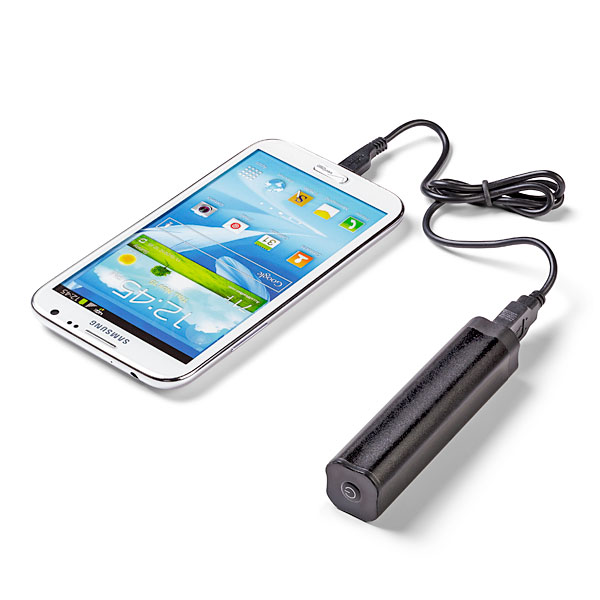
Portable ChargerIf indeed you are sharing your experience, or just trying to stay in touch with events back at home, you will definitely need a charger. I would suggest bringing one of the mobile chargers that you can keep in your pocket/purse/backpack. During the hectic schedule, you may not get a chance to go back to your room, and you may not find an open plug where you can “juice-up”. *As an addendum to this packing tip, bringing a small power strip is also beneficial as you can share one plug with a number of your peers.

…..Pack a desire to meet people and make connections:

Make ConnectionsPossibly the biggest benefit to being at Blackboard World is the ability to meet your peers and form connections that you will maintain and use throughout your professional career. At your home institution you may be the only person who does what you do, but at Blackboard World you are a small fish in a big pond. There will literally be hundreds of people with your same type of job. What better way to pick up best practices and learn what is working and not working for your colleagues, so that you aren’t stumbling around on your own when it comes to your learning management system or eLearning in general.

…..Pack some tennis shoes or at least comfy dress shoes:

ShoesBbWorld has possibly the largest population of slacks/skirts and Nikes in the eLearning universe. For a conference this large, you may be walking a quarter of a mile just to get to your next session. You also have vendors to see and colleagues to touch base with, so comfortable footwear is a must. Some of you may even spend time at Hogwarts working on your patronus, so you will most assuredly  need shoes for your journey!

Looking forward to seeing everyone there!

BbWorld16 Session Blog – Enhancing the Learning Environment Using Technology

Venetian H
July 13, 2016
1:30 – 2:20

*Everyone of college credit courses has a Blackboard component.  Every faculty member must go through rigorous online training on how to use Blackboard.

Overview

  • learning Feedback
  • tool integration
  • avatars
  • interactive learning activities
  • collaborate ultra

Featured Technologies

  • Storyline (Articulate)
  • Powtoon
  • Collaborate
  • elearning brothers

Student Feedback – breaks and used different teaching materials, enjoyed the games, fun experience, method of instruction was good, encourages attendance and learning, interactive activities, content was more like a conversation rather than a bunch of words. games you post are fun and help us to assimilate the reading assignments.

-Use Welcome to Course Storyline instead of just video
-jeopardy and other games for self-assessment competency checks

Collaborate Ultra

  • Personalized profiles
  • Whiteboard
  • Application Share
  • Polling – Brand New for July Update
  • Session Attendance Reports – Brand New for July Update

Packing your Bags for BbWorld16?

When we think of thought leading eLearning conferences that we attend like Blackboard World, we often think of them in terms of things we will come back with. There is good reason for this, as there are so many takeaways that a conference like Blackboard World provides. For the purposes of this blog post however, we will be focusing on what we should bring with us to Blackboard World 2016.

So when you pack your bags for BbWorld….

…..Pack a way to share what you learn:

For every oSharing Gadgetsne of us who are fortunate enough to attend this tremendous eLearning event, there are many, many more of us who cannot be at BbWorld. Since we all know that “sharing is caring,” bring a way to share what you’ve learned with your coworkers back home and your colleagues across the world. Whether you are live tweeting by phone or mobile device, live-blogging from your tablet or laptop, or maybe just taking notes to present, blog, or post later, you will be helping your coworkers at home and your peers across academia benefit from what you are picking up from colleagues, professionals and thought leaders.

…..Pack a charger (Mobile or otherwise):

Portable ChargerIf indeed you are sharing your experience, or just trying to stay in touch with events back at home, you will definitely need a charger. I would suggest bringing one of the mobile chargers that you can keep in your pocket/purse/backpack. During the hectic schedule, you may not get a chance to go back to your room, and you may not find an open plug where you can “juice-up”. *As an addendum to this packing tip, bringing a small power strip is also beneficial as you can share one plug with a number of your peers.

…..Pack a desire to meet people and make connections:

Make ConnectionsPossibly the biggest benefit to being at Blackboard World is the ability to meet your peers and form connections that you will maintain and use throughout your professional career. At your home institution you may be the only person who does what you do, but at Blackboard World you are a small fish in a big pond. There will literally be hundreds of people with your same type of job. What better way to pick up best practices and learn what is working and not working for your colleagues, so that you aren’t stumbling around on your own when it comes to your learning management system or eLearning in general.

…..Pack some tennis shoes or at least comfy dress shoes:

ShoesBbWorld has possibly the largest population of slacks/skirts and Nikes in the eLearning universe. For a conference this large, you may be walking a quarter of a mile just to get to your next session. You also have vendors to see and colleagues to touch base with, so comfortable footwear is a must. Some of you may spend the evening at Freemont. Let me speak from experience, walking the strip + the hotel can cause blisters in the wrong shoes!

Looking forward to seeing everyone there!

When you Pack your Bags for Blackboard World 2015

bbworld15When we think of thought leading eLearning conferences that we attend like Blackboard World, we often think of them in terms of things we will come back with. There is good reason for this, as there are so many takeaways that a conference like Blackboard World provides. For the purposes of this blog post however, we will be focusing on what we should bring with us to Blackboard World 2015.

So when you pack your bags for BbWorld….

…..Pack a way to share what you learn:

For every oSharing Gadgetsne of us who are fortunate enough to attend this tremendous eLearning event, there are many, many more of us who cannot be at BbWorld. Since we all know that “sharing is caring,” bring a way to share what you’ve learned with your coworkers back home and your colleagues across the world. Whether you are live tweeting by phone or mobile device, live-blogging from your tablet or laptop, or maybe just taking notes to present, blog, or post later, you will be helping your coworkers at home and your peers across academia benefit from what you are picking up from colleagues, professionals and thought leaders.

…..Pack a charger (Mobile or otherwise):

Portable ChargerIf indeed you are sharing your experience, or just trying to stay in touch with events back at home, you will definitely need a charger. I would suggest bringing one of the mobile chargers that you can keep in your pocket/purse/backpack. During the hectic schedule, you may not get a chance to go back to your room, and you may not find an open plug where you can “juice-up”. *As an addendum to this packing tip, bringing a small power strip is also beneficial as you can share one plug with a number of your peers.

…..Pack a desire to meet people and make connections:

Make ConnectionsPossibly the biggest benefit to being at Blackboard World is the ability to meet your peers and form connections that you will maintain and use throughout your professional career. At your home institution you may be the only person who does what you do, but at Blackboard World you are a small fish in a big pond. There will literally be hundreds of people with your same type of job. What better way to pick up best practices and learn what is working and not working for your colleagues, so that you aren’t stumbling around on your own when it comes to your learning management system or eLearning in general.

…..Pack some tennis shoes or at least comfy dress shoes:

ShoesBbWorld has possibly the largest population of slacks/skirts and Nikes in the eLearning universe. For a conference this large, you may be walking a quarter of a mile just to get to your next session. You also have vendors to see and colleagues to touch base with, so comfortable footwear is a must. Some of you may spend the evening at the Washington Mall area. Let me speak from experience, walking the Mall in DC can cause blisters in the wrong shoes!

…..Pack a Presentation!

PresentationBe a Blackboard World Presenter! The Call for Proposals is open until April 15. Share your successes, obstacles and experiences on a multitude of topics. The backbone of BbWorld are presentations by those of us in the trenches who work with faculty, students, deans, directors and Blackboard to make eLearning possible. Take the plunge and submit your proposal to present today!

There are probably many other things you can think of packing, so don’t limit yourself to just this list (checked bag fees not-withstanding). I know I look forward to seeing what my colleagues are bringing to BbWorld15 this summer!


Fight Unit Fatigue – Chunk it Like a Boss

Chunk It Like a BossWe have all experienced a first glance at what looks like an insurmountable obstacle in our learning endeavors. Maybe is was the practicum for your Masters degree, maybe it was your dissertation, maybe it was all the grading you had to catch up on after you returned from vacation.

Undoubtedly, there are strategies that we as instructors can employ to make the amount of material seem less ominous. Whether we distribute our course across, weeks, units, topics or lessons, chunking our content makes it more digestible for our students.

In this day and age many of our students are viewing courses through the lens of multiple devices, many of those with the display real estate of a tablet or smart phone. Why not take the extra step and chunk our units as well?

I like to take the extra step to organize my units across a content item and 2 content folders (depending upon the amount of coursework). Each of my units contains three things:

1. Unit Objectives
2. Unit Content
3. Unit Assignments


Example of Chunking It Like A BossObjectives (Content Item)

The objectives are a great way-stone for my student in the course. They remind the student why they are learning what they are learning and what they should be getting out of each unit. The objectives are generally a content item that the students see immediately upon entering the unit, so they don’t have to dig any deeper to see what they will be learning about.

Unit Content (Content Container)

The Unit Content container contains all of the readings, videos, articles, links and lecture materials for the particular unit. Putting them in the same spot each time leaves no room for second guessing by my students as to where the content will reside. I also place a download link at the end of the container for students who don’t like to read content on a computer/device.

Unit Assignments (Content Container)

The Unit Assignments container contains all of the assignments for a particular unit. I do this to avoid having the assignments show up at the bottom of a long list inside a unit. It allows me the flexibility to order my assignments as I see fit and utilize more folders if the assignments include large projects that work through multiple submissions. By chunking the assignments, the students will see 2 or three assignments per unit rather than 3 assignments added to what may be up to 9 other content items from readings/lectures.

At the end of each of the Unit Content and Unit Assignment container, I provide a link back to the main unit page in case the students need it.

I know that multiple clicks can turn off some students, but have found via student feedback that they appreciate this layout and are secure in the fact that they always know where to look in my online courses for course materials.  Hopefully after reading this you may want to start Chunking it – Like a Boss!

What I’m hoping to get from Blackboard World 2014

What do I hope to get from #BbWorld14 this July? Well, aside from the endorsement deals, the hefty signing bonus and the fame and fortune that comes along with attending eLearning’s premier event, I hope to get the following:

1. The Ability to Share
2. The Ability to Learn
3. The Ability to Connect
The Ability to Share
shareThe first benefit from my attendance seems obvious, right? We are supposed to share when we attend #BbWorld14.  After all, even the Care Bears thought that “sharing is caring”.  This year i am very fortunate in that I get to share not only in conversations I have with colleagues across the country, or Twitter back-n-forths.  I get to present TWICE.  This is my first time to really present at Blackboard’s premiere event.  I’ve presented as part of a panel, but never on my own, so I feel privileged.  I have the good fortune of being able to stand in front of my peers and present information that i believe is important to the eLearning sphere.

I will be presenting as part of the Certified Trainer Summit during Bb’s pre-conference workshops (frankly this one scares me because I will be presenting in front of people who do exactly what I do at their institutions) and I am pumped for it.  I’m also presenting on the last day of the conference on how we managed to put our Faculty Certification Online with an assist from the good folks at Blackboard.  I am so jazzed that i will be able to share our successes and even our mistakes with the community!
The Ability to Learn
learnThis is possibly the main reason I come to Blackboard World each year since around 2000.  I learn so much!  Learning at the feet of luminaries that present at our keynotes as well as colleagues and thought leaders who present at all the sessions is a gift that I will never be able to fully repay.  Information that I can pass on to my constituencies about the direction Blackboard is going is also key to getting faculty excited about eLearning where I work.
I take copious notes at the sessions that I attend and bookmark the blogs and presentations of others I could not so that it can benefit my people back at home.  These nuggets of wisdom, methods of learning and best practices that I can absorb will be shared with my local community for the benefit of our students.
The Ability to Connect
connectHow often do you get the chance to talk to thought leaders in your field? Yea, sure you may be able to have a Twitter discussion on occasion where you get one or two sentences in, but that isn’t all you want, right?.  Imagine a five minute sit-down with one of them.  Blackboard World affords us that opportunity.  But, even more important that that, it allows us to sit down with our counterparts at other institutions.  We can find out what they are doing and share with them what we are doing.  How cool is that?
This professional learning community that meets once a year all together is possibly one of the worlds greatest versions of a “cognitive surplus” to quote one of your keynotes from last year.
I have made friends at this event that I will be able to stay in touch with beyond the scope of a once-a-year conference.  Connections forged at Blackboard world not only benefit us professionally, but personally as well!  I look forward to affirming those connections this year as well as making new ones.
I hope these few words start to shed some light on what I’ll be hoping to receive when I attend #BbWorld14!

#bestpracticemonday – Netiquette for the Online Course

NetiquettePart of setting your students up for success in any course is to create a culture of success.  We create a culture of success by ensuring students know what is expected of them and in some cases involving them in coming up with some of those expectations.  Online students come into a course with their own thoughts and musings how about the course should operate and how they should interact with others.

Being proactive in establishing a positive culture of communication can mean the difference between student satisfaction and student frustration.  A great way to encourage positive interactions in your course is to establish Netiquette or Internet Etiquette expectations for your online course.

This blog post will cover four different types of Netiquette for the online course.  It is not an exhaustive list, but a great starting point or template from which to work.  We will look at the following four areas:

  1. Netiquette – General Guidelines
  2. Netiquette for Discussion Forums
  3. Netiquette for E-mail
  4. Netiquette for Chats/Webinars

GuidelinesNetiquette – General Guidelines

  • Keep caps lock at a minimum for emphasis: IT MAKES YOU LOOK LIKE YOU ARE YELLING
  • Be careful when using humor or sarcasm as much can be lost in translation and give offense in the online environment
  • All communication should be at a college level and include correct spelling and grammar
  • Treat fellow students and instructor with respect in all types of online-communication (e-mail/chat/discussions/web meetings)
  • Use clear and concise language (e-mail does not easily reflect your implied meaning)
  • Avoid text speak and slang (sorry, no LOL, ROFL, LMBO or IMHO)
  • Use standard fonts and font size: Arial/Times New Roman, 11-12 pt font
  • Only use emoticons when appropriate ☺

Discussion Forums GraphicNetiquette for Discussion Forums

  • Review and edit post BEFORE posting
  • Spell-check, Spell-check, Spell-check
  • Stay on Topic
  • Cite any sources you reference in your post
  • No flaming or personal/insulting remarks
  • Provide well thought out replies to thread postings, “I agree” and “Great Post” are unacceptable
  • Be respectful of others’ opinions
  • Read previous messages in a thread BEFORE replying
  • Don’t regurgitate someone else’s post, make your own

E-mailNetiquette for E-mail

  • Include your name and return address in the e-mail signature
  • Be brief: Don’t try and write the sequel to War & Peace
  • Make your subject line descriptive
  • Limit the use of Reply All, does everyone need to see your response?
  • Be forewarned about “forward”:  Be sure the original author is okay with you passing his/her e-mail on

WebinarNetiquette for Chats/Webinars

  • Don’t play with the whiteboard tools unless directed to do so by your instructor
  • If you are sharing your desktop be sure only topic appropriate windows are open
  • Use a headset/microphone combo, online meeting attendees don’t want to hear themselves through your speakers
  • Do not talk over others
  • Wait your turn to speak/use web cam
  • Make sure everything works BEFORE the session begins don’t try and get technical support in the middle of a lecture
  • If using a webcam be sure you have appropriate lighting, appropriate attire and limit distractions (pets, spouses, roommates, children)

Embed Twitter Streams/Conversations in Your Blackboard Course

Embedding TwitterThis blog post covers putting your live Twitter feed in Blackboard.  Basically you can place your feed anywhere you can edit text in the Blackboard Learn System.  That means it can go in a discussion, a blog post, a wiki page, a content item, test instructions or anywhere the text editor exists in Blackboard Learn.

Embedding your Twitter feed or a Twitter conversation will drive student engagement by putting information you want students to be familiar with, where they spend the most time.  Students can actively extend class discussions, research topical information and affirm each others posts with Twitter and embedding the feed or #hashtag search can prompt them to do so.

Here are the steps:

Visit Twitter.com and click the Settings wheel at the upper right-hand side of the screen, then click the word Settings.

Twitter Settings

Once on the Twitter Settings page, click the Widgets area on the left-hand side, then click the Create New button.

Twitter Widgets

Under the User Timeline tab be sure your Twitter handle shows up in the Username field.  Select your display options and then click the Create Widget button.

User Timeline Widget

Copy the widget code from the box at the bottom of the Edit Widget page.

Copy embed Code

Next you can Paste the code in HTML view of any Blackboard Text editor.  Start by clicking the HTML button of your content editor in Blackboard (remember this can be within any discussion, blog post, item, folder etc..).

Html Button in Content Editor

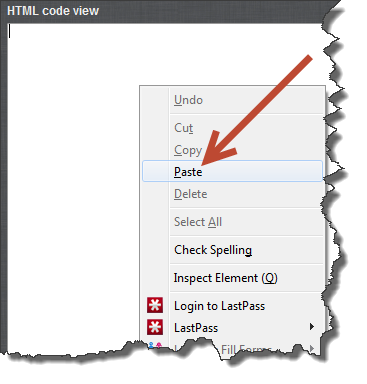
Right-click and paste or, CTRL/CMND V and paste the widget code.

Paste into HTML Editor

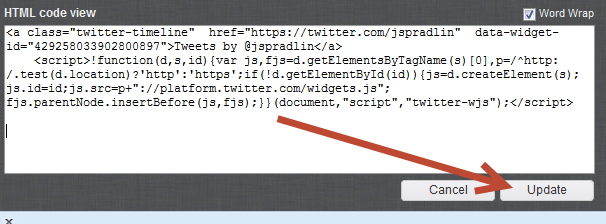
Click the Update button on the HTML view window and then click Submit.

Update

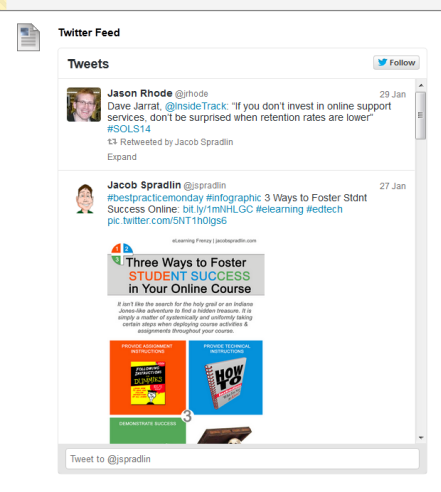
Your Twitter Feed will now display in Blackboard where you put it:

Embedded Twitter Feed

When you create your widget you can also embed a conversation that your class is having our that is happening in the Twitter-sphere. Simply use the Search tab when creating the widget and search for the #hashtag that you are using in your twitter conversations.

Twitter Conversation - Hasthtag Stream

Blog at WordPress.com.

Up ↑