Search

eLearning Frenzy

eLearning is like a sewer, what you get out of it depends on what you put into it.

Category

Best Practices

Help your Students be Reflective with Journals

Merriam Webster defines a journal as:

a book in which you write down your personal experiences and thoughts

Backboard JournalPutting down those thoughts and experiences that impact us can be an important tool in personal growth and development. Journals don’t have to be limited to the “Dear diary” entries you make at your beside table.  They can be used in courses you teach as well. In online courses journals can be used as a mechanism for communication between a faculty member and a student, or as a reflective tool for students as they work to absorb what they are learning.

Benefits of using a journal include but are not limited to:

  • Teaches students to communicate their thoughts on the subject matter
  • Forces students to be on the lookout for journal material (actually paying attention in the course)
  • Helps students to remember what they have learned
  • Keeps a record of ideas, concepts or structures that are important
  • Lets students create without fear of judgement from peers
  • Allows students to take first level thoughts to the next level – idea expansion

Creative writing teachers can benefit from using a journal.  Students can post their entries and instructors can make comments as needed.  Journals can also be used to drive home what the student has studied over the week.  Think about the reinforcement that happens when a student submits an assignment, discusses with his or her peers, takes a quiz and then puts it all together in a journal entry for the week.  Finally, journals are ideally suited for formative assessment.  Get the student’s temperature by asking them to write about their highs and lows as it relates to the course during the week.  If something comes across that is legitimate, feel free to make course corrections for the benefit of all of your students.

Here at SHSU we utilize the Blackboard LearnTM learning management system, which has a journal tool as part of it’s feature set.  Journal assignments can be placed anywhere in the course and are accessible with click of the mouse. Learn more about implementing journals in your Blackboard course.

While you are thinking of ways to ensure your students are getting what they need on their learning journey, consider reflecting on the added value of implementing journal activities to your courses.


Connect your Online Course – Give Students a GPS for Course Content

Connect Your CourseWhen you travel somewhere for the first time, doesn’t it seem to take a little bit longer to get there than it does to return home? Whether it is unfamiliar surroundings, difficulty reading the map or the GPS isn’t up to date, it can be frustratingly slow to travel to new places.

Think of your online course as that new destination for your students. How would they describe their navigation experience? Would they say that once they travel into your course that it is difficult to find their way back? Would they say that the course links were easy to find and use? Would they be frustrated trying to make it to their “destination”?

Even when we try to organize the course so it is organized into more digestible “chunks” for the students, we can make it hard to maneuver. Imagine a student lost in a Escher print of folders within folders within folders.

Connecting your course by organizing, clearly naming your navigation elements and providing an “escape route” will save your students and ultimately you time when putting together your online course.

Below are steps you can take to connect your course and save time for you and your students:

  • Use Dividers and Subheaders to visually organize your course’s navigation menuCourse Menu
  • Append the text (Click the title above to Open) on descriptions for folders, learning modules, lesson plans, web and course links.
    Click to Access text
  • Make the content item Blue if you want your students to click it
  • Chunk your course content as you would teach it in your face-to-face course.  For example: Put all Chapter content in chapter folder with different sub-folders for each chapter.
  • Provide an Escape Route by placing a Course Link at the bottom of a unit of study so that the student can navigate back to where they were before easily.Course Link

Promote Student Engagement by ‘Personalizing’ Your Online Course

Personalized Learning

The Glossary of Education Reform defines student engagement as:

the degree of attention, curiosity, interest, optimism, and passion that students show when they are learning or being taught, which extends to the level of motivation they have to learn and progress in their learning

Personalized LearningIf the above is true, then there are many ways an online instructor can impact the attention, curiosity, interest, optimism, and passion of students.  This particular blog post deals with how personalizing an online course can increase student engagement.  When an online instructor and students can invest more of themselves in on online course, the satisfaction levels reported by those same students will go up.

This particular view of online course personalization will be broken into 5 areas:


Placing Yourself in the Course

Place Yourself in the CoursePrevious posts on this blog have focused on instructor presence in the online course.  We’ve talked about establishing routines to ensure prompt feedback and instructor availability.  This particular practice revolves around something a little more superficial, but important nonetheless.

Students in an online course like to feel that they know who you are.  A text-based introductory paragraph or post in a “getting to know you” discussion forum may not fully encompass who you are to the student.  Why not take one small step and add a picture of yourself to the course.   You may already be familiar with the best practice of establishing a Virtual Office in your course where you can answer student questions.  Why not add your photo and contact information in this same area and personalize your office.

Here at SHSU, Blackboard allows you to set up a Social Profile that places your picture wherever you interact in a course (discussions, blog & wiki posts, grade center etc..). If your students feel like they “know” you, they are more likely to reach out to you and less likely to drift off into obscurity.

The logical next step in this progression is for you to utilize video to connect yourself to your course and your students, but that is a post for another time.


Allowing Students to Place Themselves in the Course

Online StudentsIn online courses it is easy for students to believe that they operate in a vacuum.  They punch their ticket fulfill obligations, and never get a good look at who is on this learning journey with them.  Allowing students to place themselves in your online course begins to build that learning community that encourages students to be successfully engaged.

Why not have your student find a way to place their image in your course.  Have them attach/upload/insert their picture as part of an introductory activity.  Some Learning Management Systems like Blackboard, allow students to create their own Social Profile that includes an image and biography.  After the profile is created the student’s face appears in the course roster, grade center and course activities (blogs, wikis, discussions, group activities etc..).

Having student/faculty images in your online course allows a more cohesive integration of group activity and shared learning.


Allowing Students to Personalize Their Learning

Personalize We know that student satisfaction goes up when they feel like they have some “skin in the game” when it comes to their learning experience.  The challenge for many online instructors is figuring out how to incorporate student content-building or contributions to the online environment.

A good first step is to find out what they know and what they want to know more about.  You as the instructor will define the boundaries from which they will pick, but a survey or KWL* assignment is a great way to start out a course.

*KWL – What do you know?  What do you want to know?  What have you learned?

You can also provide an element of continuous improvement in your courses by having your students journal each week or at an interval of your choosing.  The journal entry could serve 2 purposes:

  1. Provide a graded assignment where the student reflects upon what they learned during the week.
  2. Allow the student to tell you what the high points and low points were of the previous unit of study.

The journaling activity will allow you to make course corrections (pun intended) during the course rather than finding out where you might have some issues when the course is finished and evaluations are in.

There are other methods for involving your students in this process. The scenarios are numerous, but here are a few ideas:

  • Have your students come up with the academic integrity policy for the course to increase buy-in.  They can use a wiki or discussion board to share ideas around defining plagiarism and academic honesty.
  • Create an assignment dealing with constructing a study guide for the final and allow your students to contribute questions.
  • Use peer evaluation as a method for grading discussions and other assignments.


Feedback Early, Feedback Often

FeedbackProbably the most important way to ensure your students believe that you are personally involved in their learning is to provide prompt and frequent feedback.  Think about how you feel when someone gives you kudos on a job well done or even coaching on a subject where you might need assistance.  You feel like someone took a personal interest in something that you were doing, right?  Students feel the same way about the feedback you provide via the course.

Here are some options:

  • Make feedback part of your daily routine as an online instructor
  • Change up how you provide feedback (text/audio/video)
  • Post a weekly announcement recapping the last week’s activities and previewing the current week.
  • Too many students to reply to discussion posts?  Provide 1 summary post per discussion giving kudos and challenges when needed.
  • Schedule “office hours” where you can provide synchronous feedback a ’la chat or webinar when needed.


Personalization without Confusion

Sometimes in our desire to create a learning environment that is personal and engaging for the learner, we can add a layer of confusion that can separate the student from the learning experience we are trying to create.

So before we go tech-crazy or jump into a fun idea feeding frenzy take the following into account:

  • The Main thing is to keep the main thing the main thing.  If the personalization/engagement does not comport to the learning objective, then don’t do it!
  • Keep it simply single. Add one new wrinkle to your experience at a time. Don’t heighten student anxiety by adding lots of tools/tech that they’ve never seen before.
  • Don’t play Hide & Seek with course content and activities.  If you started out putting content and activities in a certain order, stick with it!

Here are some quick and easy ways to provide personalization without confusing the issue:

  • Use images to introduce content/topics and break the monotony of the text monopoly!
  • While keeping the same routine/order of a unit of study, utilize different activities to differentiate the way students interact with the course.
  • Change up how you deliver content to students.  Introduce a discussion activity a ‘la webcam recording or provide an audio introduction with assignment instructions that contain bonus points for those who listen.

These five methods of personalizing the online learning environment don’t have to all be done at once. As with most of the best practices on this blog, we encourage you to take it one step at a time.  Remember if you feel overwhelmed, then odds are your students will too!  Hopefully you will find your students paying more attention, being more curious, showing more interest, bubbling over with optimism and being passionate about their learning.

#bestpracticemonday – Netiquette for the Online Course

NetiquettePart of setting your students up for success in any course is to create a culture of success.  We create a culture of success by ensuring students know what is expected of them and in some cases involving them in coming up with some of those expectations.  Online students come into a course with their own thoughts and musings how about the course should operate and how they should interact with others.

Being proactive in establishing a positive culture of communication can mean the difference between student satisfaction and student frustration.  A great way to encourage positive interactions in your course is to establish Netiquette or Internet Etiquette expectations for your online course.

This blog post will cover four different types of Netiquette for the online course.  It is not an exhaustive list, but a great starting point or template from which to work.  We will look at the following four areas:

  1. Netiquette – General Guidelines
  2. Netiquette for Discussion Forums
  3. Netiquette for E-mail
  4. Netiquette for Chats/Webinars

GuidelinesNetiquette – General Guidelines

  • Keep caps lock at a minimum for emphasis: IT MAKES YOU LOOK LIKE YOU ARE YELLING
  • Be careful when using humor or sarcasm as much can be lost in translation and give offense in the online environment
  • All communication should be at a college level and include correct spelling and grammar
  • Treat fellow students and instructor with respect in all types of online-communication (e-mail/chat/discussions/web meetings)
  • Use clear and concise language (e-mail does not easily reflect your implied meaning)
  • Avoid text speak and slang (sorry, no LOL, ROFL, LMBO or IMHO)
  • Use standard fonts and font size: Arial/Times New Roman, 11-12 pt font
  • Only use emoticons when appropriate ☺

Discussion Forums GraphicNetiquette for Discussion Forums

  • Review and edit post BEFORE posting
  • Spell-check, Spell-check, Spell-check
  • Stay on Topic
  • Cite any sources you reference in your post
  • No flaming or personal/insulting remarks
  • Provide well thought out replies to thread postings, “I agree” and “Great Post” are unacceptable
  • Be respectful of others’ opinions
  • Read previous messages in a thread BEFORE replying
  • Don’t regurgitate someone else’s post, make your own

E-mailNetiquette for E-mail

  • Include your name and return address in the e-mail signature
  • Be brief: Don’t try and write the sequel to War & Peace
  • Make your subject line descriptive
  • Limit the use of Reply All, does everyone need to see your response?
  • Be forewarned about “forward”:  Be sure the original author is okay with you passing his/her e-mail on

WebinarNetiquette for Chats/Webinars

  • Don’t play with the whiteboard tools unless directed to do so by your instructor
  • If you are sharing your desktop be sure only topic appropriate windows are open
  • Use a headset/microphone combo, online meeting attendees don’t want to hear themselves through your speakers
  • Do not talk over others
  • Wait your turn to speak/use web cam
  • Make sure everything works BEFORE the session begins don’t try and get technical support in the middle of a lecture
  • If using a webcam be sure you have appropriate lighting, appropriate attire and limit distractions (pets, spouses, roommates, children)

#bestpracticemonday – Increase Student Engagment by Encouraging Interactions in Online Discussions

Encouraging InteractionsHave you ever felt left out of a discussion? When you are contributing to an effort, how does it feel to not be recognized for that contribution? Recognizing the contributions of the students in your online classes is key to increasing their participation. Here are some strategies for success:

  • Reply to a handful of discussion posts for each forum picking different students each time
  • Give Kudos and Challenges (recognize the contributions and offer challenges to encourage your students to reach beyond)
  • For larger classes do one summary post for each discussion mentioning students by name

If students believe you are actually reading their contributions they will work harder to ensure quality and quantity of their efforts.

Embed Twitter Streams/Conversations in Your Blackboard Course

Embedding TwitterThis blog post covers putting your live Twitter feed in Blackboard.  Basically you can place your feed anywhere you can edit text in the Blackboard Learn System.  That means it can go in a discussion, a blog post, a wiki page, a content item, test instructions or anywhere the text editor exists in Blackboard Learn.

Embedding your Twitter feed or a Twitter conversation will drive student engagement by putting information you want students to be familiar with, where they spend the most time.  Students can actively extend class discussions, research topical information and affirm each others posts with Twitter and embedding the feed or #hashtag search can prompt them to do so.

Here are the steps:

Visit Twitter.com and click the Settings wheel at the upper right-hand side of the screen, then click the word Settings.

Twitter Settings

Once on the Twitter Settings page, click the Widgets area on the left-hand side, then click the Create New button.

Twitter Widgets

Under the User Timeline tab be sure your Twitter handle shows up in the Username field.  Select your display options and then click the Create Widget button.

User Timeline Widget

Copy the widget code from the box at the bottom of the Edit Widget page.

Copy embed Code

Next you can Paste the code in HTML view of any Blackboard Text editor.  Start by clicking the HTML button of your content editor in Blackboard (remember this can be within any discussion, blog post, item, folder etc..).

Html Button in Content Editor

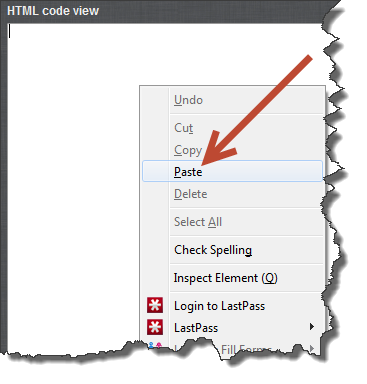
Right-click and paste or, CTRL/CMND V and paste the widget code.

Paste into HTML Editor

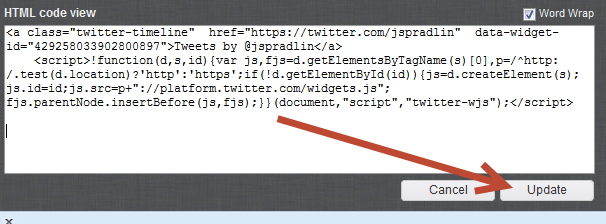
Click the Update button on the HTML view window and then click Submit.

Update

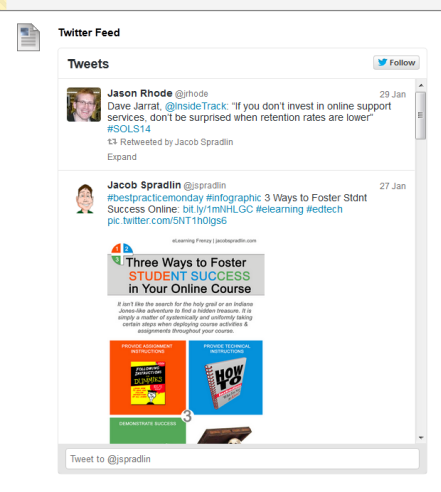
Your Twitter Feed will now display in Blackboard where you put it:

Embedded Twitter Feed

When you create your widget you can also embed a conversation that your class is having our that is happening in the Twitter-sphere. Simply use the Search tab when creating the widget and search for the #hashtag that you are using in your twitter conversations.

Twitter Conversation - Hasthtag Stream

3 Ways to Foster Student Success in Your Online Course

Have Students Invest in Academic Integrity in Your Online Course

Academic Integrity WorldeOne of the biggest challenges facing distance learning today is ensuring academic integrity. There are an overwhelming amount of blog posts, scholarly articles and stories in the Chronicle covering this topic. Let’s clear the air now and state that there is no absolute, sure-fire way to eliminate cheating in your online courses, just as there is no way to do it in your face-to-face courses. However, you can educate your students about academic integrity as part of their course activities, thereby ensuring that they understand what expectations you have of them in regards to academic integrity in your online course.

Here are some examples:

  • Have students submit an assignment, blog post or journal entry on how they would define academic integrity.
  • Have students use their own words when describing the course’s academic integrity policy.
  • Provide a discussion assignment where students can discuss the importance of academic integrity in online courses.
  • Have students “sign-off” on the course’s academic integrity policy stating that they understand what the policy means and how it pertains to them.
  • Utilize a course wiki and have students create the academic integrity policy (have specific requirements).

Having students invest in the academic integrity of your course will go along way towards having them make good choices when it comes to academic decisions in the online environment.

#bestpracticemonday 5 “Resolutions” for Online Instructors in the New Year

New Years ResolutionsEach new year brings new growth, new ideas and new commitments for us to do things to make ourselves better personally and professionally.  Whether we are inspired by too much turkey over the holidays or an urge to start with a clean slate, no other time of the year seems more appropriate for these determinations. Perhaps this year, we may consider some New Year’s Resolutions for our online courses!

Let’s face it, online teaching, like too much turkey, can really weigh you down. During a long semester, we can get buried in grading assignments and responding to discussion posts, and the lofty goals we started off with for engaging our students can seem dimly out of reach.

With a holiday break and a start to the new year/semester fast approaching, now is a great time to resolve to adopt a few pedagogically sound teaching and learning best practices for our online courses. While there may be several measures we can adopt to improve the overall quality of our online teaching environments, here are five easy to follow, easy to apply techniques that will make our online courses that much more engaging. Remember you don’t have to do all 5!

1.  Model How the Course will go for Students with a “Getting Started” Unit

Getting StartedA smart move for any online instructor is to implement some kind of ‘orientation unit’ for the online student.  This unit can serve the purpose of introducing the student to his or her online course environment, as well as other important course information.  Expectations, rules of the road, and an operator’s manual are usually communicated within this unit.

It is important to set this unit up just like every other unit in the course.  Model orientation content and activities in such a way as to reflect how the rest of the units will be structured.  The student will not only gain the benefit of understanding how the online course operates, they will get the added practice of going through course units as they would normally throughout the course.

2.  2-4-6-8 it’s Time to Differentiate

Differentiated Instruction GraphicWe would be hard-pressed to negate the notion that are our students are not identical. Each of our learners comes to us with varying degrees of abilities, aptitude levels, interests, learning experiences and needs. While it may not be feasible to get to know each of our students on a personal basis, we can make some general deductions about the learning diversity that is present in every course we teach.

This is where Differentiated Instruction comes in. For those of us in the field, the term refers to the theory that since no two students will learn exactly the same way, instructors have the opportunity to structure and design their teaching environments using a variety of instructional methods that may reach a broader swath of the student body. The online environment really lends itself to this approach. With the advent of various technology tools, we can now choose to diversify our approach to lectures, activities and assessments and more.

If you are wondering how to add more diversity of instruction to your course, start with the following. It’s as easy as A-B-C!

a.      Realize your students are unique, and discover ways to get to know them.

Realistically speaking, we may not get to know our students as well as we would like. But we can implement an activity or two to catch a glimpse into who they are and what their learning approach may be. For instance, at the beginning of your course, introduce an ice-breaker discussion forum and ask your learners what they do in their free time. You will be surprised by what you can learn!

b.      Look critically at your course, and identify a few areas where you can introduce diversity of instructional methodology.

Sit back and consider your students’ learning objectives. Take a look at how you are introducing and enforcing these key concepts at the moment and select an area or two where you may introduce a different approach. Perhaps an audio lecture may be a welcomed alternative to the text-based reading. Or, perhaps you may want to spice up your course with content from the Khan Academy, Ted Talks, or NBC Learn. Often regarded as “mashups” the introduction of external collective knowledge in an online course adds variety, and piques students’ interests.

c.       Consider the Context and Role of the Online Instructor.

The online environment can present us with options we may not have readily used in our face-to-face courses…so make the most it! While having lots of choices may seem daunting, starting with one or two will help keep them manageable. Online Instructors should think differently about their teaching, because in the online environment where rich, educational online resources abound, we become more of a guide on the side, than a sage on the stage.

3.  Set Due Dates to Coincide with Support Desk Hours

This resolution is an easy one to keep!  First, learn your Technology Support Desk hours (SHSU Online is 7am – Midnight, Mon-Sat).  Once familiar with Support’s hours of operation, make sure any due dates, tests or technology oriented activities fall when the Support Desk team is available.  This is important because the students will have someone to call when the technology doesn’t work or their interpretation of how the technology should work is different from actually happened.

4.  Set a Schedule for Course Interactions, Be Consistent

SchedulePart of being available in a course, and establishing ever-important instructor presence, is letting your students know when you are available.  A great way to do this is to establish a routine for your course interactions.

  • For starters, you can let them know that you will get back to them on questions posted in your Virtual Office discussion forum a time period you establish at the beginning of the term (usually within 24 – 36 hours)
  • Hold regular “office hours” with the asynchronous chat tool (Skype, Bb Chat or Collaborate, Google Hangout) where you will be available in real-time to answer your students questions if need be.
  • Post an announcement and send it out via e-mail once a week summing up the previous week’s events and highlighting the important aspects of the next week.

By establishing a routine, you form a habit of being available in your course that your students can count on.

5. Have fun!

Remember the excitement of teaching? The opportunities to lead, change, inspire, and innovate? Perhaps you connect with the intrinsic motivation of knowing you are making a real and tangible difference in many impressionable minds. Whatever that original point of motivation is for you, we can all connect with what originally prompted us to teach.

Being an online instructor is the perfect chance to express your teaching philosophies in a number of diverse and effective ways. Make your course as exciting as your teaching. Personalize it. Make it your very own. Let it show your unique teaching style and at the end of the day, resolve to have fun doing what you do best…teach!

Create a free website or blog at WordPress.com.

Up ↑