Search

eLearning Frenzy

eLearning is like a sewer, what you get out of it depends on what you put into it.

Tag

Blackboard

NBC Learn on Blackboard – Adding a Media Rich Resource to Your Courses

NBC Learn on Blackboard


One of the best things about the connectedness of the web space is the ability to find media rich content to supplement or enhance course activities and materials.  The beauty of this particular medium is that it is not just left to the instructor to utilize this media.  Students can now liven up online discussions, assignments, projects and more with historical, current or relevant video or audio media.   YouTube has long been a mainstay in this arena, in that it’s API allows for easy integration and everyone is familiar with what it does.  However, there are other vast collections of resources out there that are relatively untapped by the student/faculty population.  One of these curated resources is NBC Learn.

NBC Learn is a rich and unique resource that provides thousands of historic news reports, current event stories, original content, primary source documents, and other digital media specifically designed to teach and engage students.  NBC Learn content can easily be downloaded for offline use or connected to your institution’s Learning Management System, which in my case is Blackboard.

The content is also fully accessible it allows for keyboard navigation, assistive technologies(works with screen readers), support for deaf and hard of hearing.  http://www.nbclearn.com/accessibility

NBC Learn Portal

You can Browse NBC Learn, and see the Collection of all NBC resources within the NBC Learn environment.  You can browse by category that best matches your field of study or just Search NBC Learn via keyword.

Each video has its own CueCard with metadata like source, date, description, keywords, & citation (allows students or faculty to include citation in posting), as well as transcript tab for full transcript.

NBC Learn Cue Card

  • Each video can be saved to your personal playlist within NBC Learn.   You can also print a 2 dimensional version of the CueCard.
  • Download:  You can choose a quality version and save it locally to your computer. (You will need administrative access to your computer as the download will be an executable NBC Learn player)
  • Videos can be sorted for easier searching. (Title, Date, Story Date, Alphabetic, Recently Updated)
  • Don’t see your category? NBC Learn allows users to “contact us” and add comments/suggestions in terms of new categories for the NBC learn site.

NBC Learn on Blackboard


NBC Learn & Blackboard – Working Together

There are a couple of ways to add NBC Learn content to your courses:

  1. Employing the Mashups button anywhere you use the Blackboard text/content editor (items, folders, discussions, etc…)
    Adding NBC Learn to Blackboard

    This particular option allows both you and your students to build context around the video.  Whether you are introducing a unit or your students are adding to a vibrant online discussion, using the Mashups button in the content editor can add rich media throughout your Blackboard course.

  2. Accessing the Mashups area under Build Content and selecting NBC Content (places content directly in content area as it’s own item).NBC Learn Mashup Item

    The beauty of this option is that the media itself becomes a piece of course content.

*Depending upon your institution’s setup, you may be able to leverage a NBC Learn content module that will allow you to display categories of videos like: NBC Learn Science, History, News, Social Studies etc…

NBC Learn and Blackboard have integrated and that is a win for Blackboard instructors and students.  Now course content and contributions can become more rich, relevant and engaging!

BbWorld15: Increasing Student Engagment with Digital Badges – Session Blog

Speakers:
Megan Cole – Head of Marketing at Badge Labs
Dr. Melissa Stange – Lord Fairfax Community College
Richard Shelton – Coordinator of Academic Services Northeastern State UniversityDonna Shelton, PHD – Professor of Spanish, Northeastern Oklahoma


Badge Labs – Consulting and Development term for Open Badges

Open Badges Ecosystem:

What are open badges?
Representing skills that are real based on real tasks and work.  Employers are willing to pay for hire for and give credit for real results.

can be used to:

  • recognize learning
  • Assessment learning
  • Motivate learning
  • Study learning

Badge anatomy: name, description, criteria, issuer, evidence, date issued, standard, tags

Badges can

  • capture complete learning path,
  • build maps of learning and pathways & opportunities of more learning,
  • build and communicate reputation & identity,
  • foster an ecosystem that is connected,
  • signal learning to key stakeholders & potential employers.

Building an Open Badges Ecosystem: Openness, Learner Agency, Innovation (Blackboard, IMS Global, Mozilla, Badge Labs, digitalme, Pearson, concentric sky)

We will be at 10million badges issues by 2016.

Lord Fairfax CC Digital Badge Pilot: 1 f2f two online courses 74 students in total, badges & certificates possible, adding a “My Badges” button, Mozilla backpack.

Students didn’t know how badges apply to them after they left college.  Had to educate the students while they educated us.  Credly was more preferred to backpack.  GPAs went up.   Badges were a motivator

Results

– Retention rate went up
– More uploads to backpack if extra credit given
– Increased quality of learning
– increased faculty discussion of badges
– Improved collaboration in online courses
– Expanded learning opportunity – e portfolio
– Provided discussion between curriculum advisors & college
– CBE moving forward got approved
– nationally accredited badge

Lesson’s learned

  • If only content is copied between courses, the trigger rules are lost
  • If content is not included in a copy or export/import achievements are not export
  • select both content & adpative release rules to get copied correctly
  • Bb admins have to set up goals before faculty can add as an alignment to get on goal coverage report
  • Had to add extra content (lecture) to explain badging & badge backpack
  • Takes time to setup initially
  • Learning terminology
  • triggers elements not changeable, recreate
  • No direct path to change rewards

Next Steps

  • Continue data collection
  • expand badges in computer science
  • continue to work with deans for faculty adoption
  • Submit badge research and pilot finding for publication in system journal
  • Assist knowledge to work CBE team to create new national credential badge
  • Develop System-wide badges in conjunction with articulation agreements
  • Work with local industry
  • Continue to participate in the IMS global networking CBE group

Richard Shelton – Northeaster State University

  • Achievements to recognize all learners: students, faculty, staff community
  • First introduced in individual courses
  • In near future expanding to faculty and staff
    – Faculty Professional Development
    – Human Resources Training
  • Continued Education

Use in course projects – series of milestones awards: submissions and completely and grade they received.

used to increase motivation to submit assignments and to improve submission rate

Encourage students who enjoy gamification (used in university studies course)

Positive anecdotal results.

Sequential online instructor training courses – used to promote awareness of badges.

Next Steps:  Moving to University-level achievements.

Continuing education – Police Officers seem to like badges.

Donna Shelton:

CAEP is new version of NCATE -CAPE go throuth SPAs to evaluate various groups

Digital badge use through Blackboard to be implemented in fall 2015 as key element of new program.

New digital badge based assessment eight aligned ACTFL Standard 6, Professional Development, Advocacy and Ethics

Standard 6: candidates engage in ongong professional development opportunities that strengthen linguistic, culture and pedagogical competencies.

– Series of conferences with program faculty (educate about badges)
– Course embedded and extracurricular opportunities to earn badges: 3 badge categories, acceptable performance level: two badges in each category
– Reflection essay in last half of student teaching semester

Badge Types and example Tasks:

Language Proficiency, Cultural Knowledge and Pedagogy

Why?

  • help with motivation
  • recognition for extra-curricular activites
  • tracking accomplishments, help with resume
  • educate badge consumers
  • marketing with badge images

Custom achievements, badge icon creation, use Organizations to track across courses, Upgrade will include portfolios that go across courses.

Challenges:

  • students as earners – educating
  • Issuers (faculty) – educating
  • University as issuer – logistics, rules etc..
  • Outside issuers – local industry, cont. ed, professional development, HR
  • School districts as consumers.

BbWorld15: Blackboard Learn Top 10 for Faculty – Things You Can Use Today and What’s Coming Down the Road – Session Blog

Speakers
Wade WeichelSenior Product Manager
Blackboard INC.


11. Tool Integrations LTI – (Learning Tool Inneroperability) at course level

10. Date Management – the ability to manage due/availability dates across your Bb course on from one page.

9. Student Preview – ability to view your course as student, all the way down to My Grades

8. Bb Grader – iPad app that allows an instructor or evaluator to review submitted assignments.

7. Retention Center – allows faculty to track student risk indicators without difficult setup/configuration.

6. Grade Center – Grade History – track grade center interactions over time

5. Test Power Features (significant digits, test exceptions, Access Log [lets you see in timestamped way that student’s interaction with a test], IP Address Filters (assures integrity in high-stakes testing environment]

4. Authentic Assessment (Large projects, capstone portfolio – complex set of work, direct assessment, generally not an exam.  (extensive feedback)  [Assignment Tool, Portfolio assignments, Wikis, use of Rubrics, SafeAssign, non-electronic observations…]

3. Delegated & Anonymous Grading – good for high-stakes testing for anonymity for delegated graders as well as students, large course section grading of assignments can be distributed.

2. Goal Alignments to Question Items and Individual Rubric Criteria

1. Goals Manager – Mapping Tool – ability to update content alignments

What is Bb Working on?

  • New Student Dashboards (Competency Based Education)
  • Workflow Improvements & Usability (thread navigation in discussion board grading)
  • Simpler posting of grades to the SIS
  • BbGrader grows to BbIsntructor fully fleshed out.
  • Bb Ultra improvements including calculated column formula builder

BbWorld15: Blackboard Collaborate Road Map – Session Blog

Speakers:

David Hastie Sr. Dir. Product Management
Carl Marrelli Sr. Product Manager


**Some these are forward thinking statement and may or may not end up being in the final product.

Collaborate Ultra has been out for a couple of months and the initial feedback has been super positive!

3 objectives in Collaborate redesign:

  • Simple – easy entry into sessions, browser based, sleek intuitive interface
  • Modern – Cutting edge media technology, accessible, Mobile
  • Focused – Designed for education, varied instructional strategies/methods, Deeply integrated with the LMS

Highest level of quality and innovation – enhancements andmaintenance more quickly released with zero downtime

Key Benefits

  • HD Video & Audio Puts you right in the Center
  • A world class user experience to encourage use
  • Supporting Asynchronous learning models, native mp4 recording and playback
  • Web-Based – get started immediately no need for java or downloading launchers.

Available no in all regions and in 26 languages.  Application is responsive adjusts based upon the format of device that you are viewing it on! Also adaptive based on type of content.

Current use Cases:

  • office hours
  • group collaboration
  • teaching & learning

Learn 9.1 – If you use you can use new Collaborate Ultra with B2. New Collaborate B2 Supports session in old and new collaborate experience. Allows for piloting while still using old system.

Chat panels pop out when in use!

Sharing file interface is simple and easy to add and annotate! Several annotation tools with several colors.  Either on top of images or files like powerpoint, pdf, jpg.  Sharing Browser instances as well.  Things you share are easily identifiable.

Records whatever is being actively shared + Audio. Conference members can live-caption or translate a session!

Mobile: Collaborate is directly integrated into Bb Student. Is currently in Beta. Should be available soon.

Collaborate functionality allows for students to be presenters. Moderator can make student presenters as well! Application sharing is so much better.  Moderators can easily stop student sharing.

Future Capabilities:

If you need the alternative to be better than the status quo from the start, you’ll never begin!

  • Mobile experience
  • Polling
  • Feedback Mechanism
  • Breakout Rooms
  • Phone Conferencing – telephony integration
  • Moodlerooms Integration

BbWorld15: Best Practices for Implementing Blackboard Communities – Session Blog

Speaker
Adam Voyton
Wilmington University

Once you get the license, what do you do with it?  Customize interface to engage students and faculty across your institution.

Customization:

  • Create tabs, sub-tabs, and modules
  • each tab, sub-tab can be configured to appear to users that are assigned to a particular role
  • A module is bascialy a box that can contain: text, video etc..

Primary Roles are Students, faculty, staff.

For tabs or modules that have information relevant to students and or faculty in certain department, we set up college-specific institutional roles.

Student/faculty login has generic content and customized content.  Advertising, Marketing, Student Life

Students: Top layer tab has student services tab – links to student service pages, Jobs for Kats as Top Layer Tab
Faculty: (Faculty services tab – centralizes info that was scattered across website)  My media module (Kaltura)

Subtabs – Tech Support/Resources (support desk hours) (clean up My courses video), Kaltura subtab, My media and faculty repository on it along with self-help for Kaltura.  Blackboard Collaborate  subtab(embed the webpage), Blackboard subtab for IM.

Wilmington uses colleges on Top lvl tabs that contain info that they may want behind a login.  Each of these tabs have subtabs with more info   (question, how do you envision having 6 tabs one for each college).  Tabs to other systems

Things to Keep in mind:

*Tabs don’t open up in new browser tab.
*when embedding content use HTTPS*Have rules and policies for what content can go where (Governance)
*Set up a calendar to manage/schedule the content
*keep MY Courses at top right and announcements at top center

Blackboard Organizations

Bulk of orgs are Academic in nature, a fair amount of student orgs, smaller honor societies and departments.

Come up with and keep up with a naming convention.

Implementing Communities  (Organizations Subtab with “My Organizations” module)  Contains video explaining what orgs are and how they work. Including support documentation.  (Have an org catalog), link to a request form.

3 ways to enroll users into orgs: 

  • Self Enrollment – No level of privacy
  • Manual Enrollment – Leader has complete control, but has to do it all themselves.
  • Automatically adding someone who meets a certain criteria (SIS Based), some people may not want to be enrolled. (come up with un-enrollment process – place a default link in orgs with instructions to e-mail leader etc..) come up with code of conduct link for orgs as well.

Tips to Increase Students Use of Organizations (Require leaders to go to training)

– Make registration process simple
– Put out a press release on ORGS (get the word out)
– Videotaping campus events or use collaborate
– have student representatives talk for them

Online Student Association – Blackboard Org  (Engaging Online Students) – automatically add every student taking an online course.

  • Discussion board of the month – “What can we do to engage our online students at homecoming?”  small giftcard or prize of randomly selected participant
  • Online Student of the Semester – (we can use our ads)  Short little bios, students can apply we can focus on them.
  • Introductions Discussion Board (Networking)
  • Have video and webpage about this organization

Remind your constituencies what Blackboard Communities does for them. Press Releases, videos etc…  Target program chairs about Bb Orgs.

Lessons Learned:

– Get Departmental Involvement
– Dedicate a staff member to serve as community admin- Audit content every year
– People that do not have a Bb Login will not be able to access any content in Orgs

BbWorld15: Leveraging Blackboard to Introduce New Faculty to Essential Technologies – Session Blog

Speakers
Kimberly Evans
Joey Robinson
Reynolds Community College

TTS 101 Orientation to Essential Tech is an online orientation designed to streamline the on-boarding process and acclimate newly hired faculty to various technologies and services.  A collection of modules are housed within Blackboard introducing faculty to the wide range of tech resources they will be expected to use.

Upon hire faculty are automatically enrolled and through Blackboard complete each module.  They will remain enrolled for 1 year.  Once completed, deans and chairs are notified and they receive 1.5 hours of professional development.

Information is distributed at faculty orientations, convocation.

Orientation contains:

  • brief video of objectives
  • self-guided activities
  • self-assessment
  • resources

Each of the modules use adaptive release to move faculty on to the next module when they complete the previous one.

Menu: Possibilities: (Start Here, E-mail, Computer account, SIS, LMS etc..)

Exit survey posted at the end of session to measure effectiveness of orientation.  (It is not mandatory to complete training)

Reynolds looked at helpdesk tickets (Logon Concerns, Email, Software) they all decreased over time with implementation of orientation.

Don’t ask, just congratulate when welcoming.  Not “Would you like to participate?”, but “Congratulations, you’ve been enrolled..”

‘Twas the Week Before Blackboard World’

‘Twas the week before Blackboard World,
not much longer will we wait.

Thinking about multi-booked sessions

for which we’ll be late.


Meeting with vendors, colleagues and more,

Technology experts and topics to explore.

Pre-conference workshops to jumpstart our brains

learning best practices on which we will train.


I’m interested in training, f2f and online,

so many sessions, so little time!

T-Bug, best practice, pedagogy first,

networking with colleagues, you work up a thirst!


Vendor exhibits, giveaways galore,

Or maybe a door prize of which we will score!

We will listen, we will talk, we will soak up the knowledge,

and share our experiences with private sector, k-12, or college.


We look to return come Friday next week,

loaded with the knowledge we strove to seek.

So I say to you all, let’s learn without fear,

for if we want more, we wait ‘till next year!

Course Banners are NOT just for Course Landing Pages

Since the early days of Blackboard and other Learning Management Systems in the field, Course Banners have been a great way to personalize the online or web-enhanced learning environment. Instructors could differentiate any course by starting it out with a graphic or photo of their own choice/making. Course Banners have been used far and wide since then to add flare and personalize the online and blended environment.

Course with Banner ScreenshotFor years, instructors who used Blackboard have been operating under the assumption that a Course Banner could only be used on the landing page of a Blackboard course.  Well guess what?  Course Banners can be placed almost anywhere in an online/web-enhanced course. Check out this before and after photo of a Blackboard content area, in this case Lesson 1:

Before and After - Adding BannersWith just the addition of a few graphics, a theme change and a Banner image, we can add continuity to the course as well as make it more engaging.

How do you do it?

Show Text OnlyFirst, you will want to give yourself more real estate in the Content Area where you will be placing the Course Banner.  You do this by changing your page options to show text only.

  • Ensure your Edit Mode is on.
  • Click the contextual menu next to your page title and select Page Options.
  • Click Show Text Only.

This gives you more space for your graphic to live in the content area where you place it, by removing the icon that shows up next to your content title.

Note: It is also a good idea to make your Course Banners in the subsequent course content areas a little bit smaller. This cuts down on load time as well as screen resolution issues.

Add ImageNext, add/edit a Content Item on your page and add an image to the top.

  • Add/Edit a Content Item.
  • Click the Add Image button.
  • Browse and Attach your Banner.
  • Click Submit.

You will now have a content item with a banner graphic that is placed at the beginning of the content area, folder or module of your choice:

Adjusted Content Item ExampleThis practice will add a layer of continuity and engagement to your course. If your students feel like they are in a familiar place and are engaged while browsing, their satisfaction levels will increase. Consider adding more Course Banners to your online/web-enhanced courses today!

When you Pack your Bags for Blackboard World 2015

bbworld15When we think of thought leading eLearning conferences that we attend like Blackboard World, we often think of them in terms of things we will come back with. There is good reason for this, as there are so many takeaways that a conference like Blackboard World provides. For the purposes of this blog post however, we will be focusing on what we should bring with us to Blackboard World 2015.

So when you pack your bags for BbWorld….

…..Pack a way to share what you learn:

For every oSharing Gadgetsne of us who are fortunate enough to attend this tremendous eLearning event, there are many, many more of us who cannot be at BbWorld. Since we all know that “sharing is caring,” bring a way to share what you’ve learned with your coworkers back home and your colleagues across the world. Whether you are live tweeting by phone or mobile device, live-blogging from your tablet or laptop, or maybe just taking notes to present, blog, or post later, you will be helping your coworkers at home and your peers across academia benefit from what you are picking up from colleagues, professionals and thought leaders.

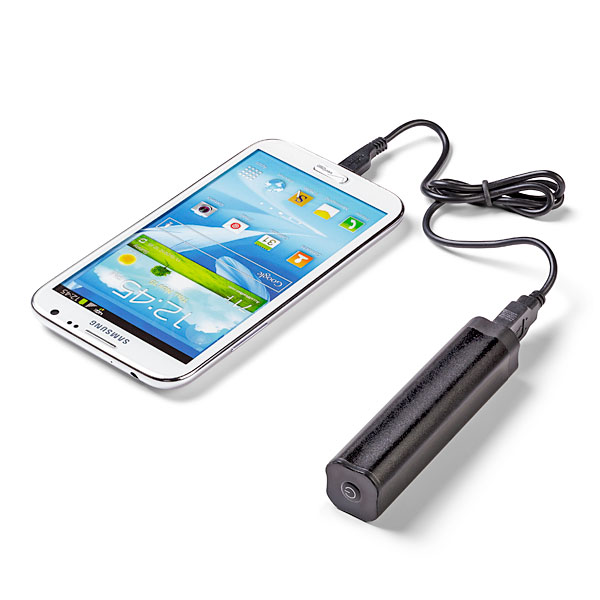
…..Pack a charger (Mobile or otherwise):

Portable ChargerIf indeed you are sharing your experience, or just trying to stay in touch with events back at home, you will definitely need a charger. I would suggest bringing one of the mobile chargers that you can keep in your pocket/purse/backpack. During the hectic schedule, you may not get a chance to go back to your room, and you may not find an open plug where you can “juice-up”. *As an addendum to this packing tip, bringing a small power strip is also beneficial as you can share one plug with a number of your peers.

…..Pack a desire to meet people and make connections:

Make ConnectionsPossibly the biggest benefit to being at Blackboard World is the ability to meet your peers and form connections that you will maintain and use throughout your professional career. At your home institution you may be the only person who does what you do, but at Blackboard World you are a small fish in a big pond. There will literally be hundreds of people with your same type of job. What better way to pick up best practices and learn what is working and not working for your colleagues, so that you aren’t stumbling around on your own when it comes to your learning management system or eLearning in general.

…..Pack some tennis shoes or at least comfy dress shoes:

ShoesBbWorld has possibly the largest population of slacks/skirts and Nikes in the eLearning universe. For a conference this large, you may be walking a quarter of a mile just to get to your next session. You also have vendors to see and colleagues to touch base with, so comfortable footwear is a must. Some of you may spend the evening at the Washington Mall area. Let me speak from experience, walking the Mall in DC can cause blisters in the wrong shoes!

…..Pack a Presentation!

PresentationBe a Blackboard World Presenter! The Call for Proposals is open until April 15. Share your successes, obstacles and experiences on a multitude of topics. The backbone of BbWorld are presentations by those of us in the trenches who work with faculty, students, deans, directors and Blackboard to make eLearning possible. Take the plunge and submit your proposal to present today!

There are probably many other things you can think of packing, so don’t limit yourself to just this list (checked bag fees not-withstanding). I know I look forward to seeing what my colleagues are bringing to BbWorld15 this summer!


Blog at WordPress.com.

Up ↑