Search

eLearning Frenzy

eLearning is like a sewer, what you get out of it depends on what you put into it.

Tag

Blackboard

BbWorld16 Session Blog – The Blackboard Portfolio Tool

portfolio-iconJuly 14, 2016
9:30 – 10:20am
Titian 2205

Features, Uses and Campus Wide Implementation process

Jason Rhode and Stephanie Richter
Northern Illinois University – Faculty Development & Instructional Design Center

  • Background Info
  • Bb Portfolios: Features and Examples
  • Campus-wide implementation process
  • Portfolio Usage across campus
  • Considerations

Building Portfolios

  • Add artifacts from files or from prior Blackboard assignment submissions
  • Embed media directly in the page
  • customize and preview features
  • Manage multiple portfolios for different purposes
  • Use templates for standardized portfolios

Grading Portfolios

  • Faculty can create an assignment with portfolio submission enabled
  • If Portfolio submission is enabled, student can only submit a portfolio
  • Faculty can grade and provide feedback as usual in the grade center

Sharing Portfolios

  • Share snapshots internally with institution users
  • Share snapshots externally with people outside institution (grad school/employers)
  • Download entire portfolio as a zip file (HTML) for future use and portability

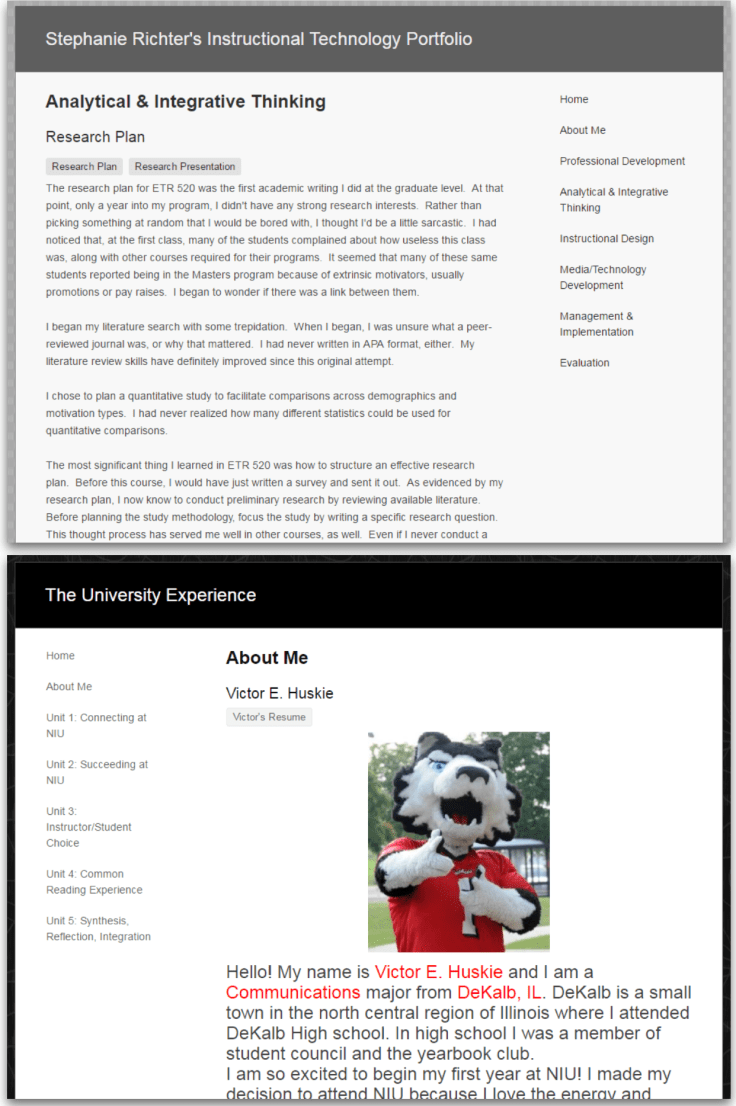
Portfolio Examples
porfolio1

porfolio2.png

Campus-wide Implementation Process

  • Identify key stakeholders
  • Raise Awareness
  • Test Portfolio Tool
  • Develop Support Resources
  • Train Users

Key Stakeholders

  • Provost’s Office
  • Assessment Office
  • IT
  • Faculty Development Center
  • FYE

Raise Awareness

  • ePortfolio symposium
  • University Tech conference
  • e-mail newsletters etc..

Considerations

  • Staffing (support, development technical)
  • Implementation time (1 year)
  • Support Resources (robust and multi-format, samples)
  • Establish policies (who gets template? naming, who approves template format? How long are student accounts active and portfolios accessible?)

Summary

  • Implementing portfolios is a campus wide process involving multiple stakeholders
  • Consider how portfolios will be used for teaching and assessment as you plan your implementation
  • Students will need most support, but faculty need to be comfortable so that students can be successful.

There is a Bb Portfolio Users group on community.blackboard.com



BbWorld16 Session Blog – Build Online Engagement through a Virtual Student Unions

Bellini 2003
July 14, 2016
8:30 – 9:20

Engagement (Tinto)

  • Academic and Social engagement promotes college succes
  • Social connections lead to social and emotional support
  • Great involvement in educational activities and learning

SACS

  • Provide support program
  • Services
  • Activities
  • Promote student learning and development

The plan a Virtual Student Union

  • Support for successful online learning
  • Easy to find resources
  • Connecting learners to TROY
  • Positive educational experience
  • Social Engagement

*Trojan Cafe shows up as a course for all students.

  • Course entry page is web embed with highlights, dates/calendar and headlines.  Articles that are relevant to students: preparing for grad school, how to budget, dealing with tragedy (orlando)).
  • Online contests and giveaways.
  • Student forums: General chat, textbook exchange, contests and giveaways, military student room, how can we help?
  • Robust Resource site (html again) blackboard tutorials, online writing center, advisor, etc….
  • HTML pages through course to promote engagement (essentially a website within a course)
  • Trojan cafe course pages are HTML Blackboard Content Management System (CMS) Web folder URL.  Blackboard Course Created (URL button added), pages designed in adobe muse, webpaged saved as html

BbWorld16 Session Blog – Student Success in Higher Education: Plan, Predict, Engage

Venetian G
July 13, 2016 4:35 – 5:25

Only 59% graduate from college after 4-6

12.5 Million 20-somethings with some college credits and no degree

Understanding students’ struggles through research – what we learned:

  • Student journey is messy
  • Students feel alone and anxious
  • feel urgency to make decisions
  • lack of connections between short and long-term goals

The average advisor to student ratio – 1:300

Student success is a complex problem, but there are clear ways Blackboard can help.

Our student success philosophy

  • Plan
  • Predict
  • Engage

Blackboard Plan -empowering students to take control of educational journey (exploration, planning, registration) Partnership with Burning Glass

  • Discover careers based on interests (in development) Bb Plan
    Students can self-identify interests and seek careers that align with those interests
  • Explore career and skill demand (is there demand for that profession and if so, where is it?)
  • Learn about jobs first hand – partnership with road-trip nation (video interviews of people in professions) giving students first hand accounts of working in desired profession.  See real job postings that exist today
  • Seek Help from Advisors – making help accessible to students
  • View Degree Progress
  • Conduct “what if” analysis (what if I wanted to that program instead?)
  • Planning a course schedule
  • Register for courses

Blackboard Predict – Humans helping students (enabling those people to do a better job at helping students) Importance of Data, What they are doing with Data

  • Predict takes in 2 data sources SIS (demographic data) and LMS (course activity)
  • Taking that data and predicting (probability that student will pass etc..) which then points to who should I reach out to and who would benefit most from the interaction? for advisor.
  • Knowing more about students, passing the data on through a display that gives advisor more information about you (helps advisor engage with student to build relationship)

Blackboard Engage – The business of being a student needs to be easier (personalized, relevant and focused on student success)

  • Building toward a streaming pathway
  • supporting entire student lifecycle from inquiry to enrollment to student support: Global advisor and coach community, lead nuturing and enrollment mgmt, student support services, and more…
  • Communications need to be customized to where that student is in their lifecycle and who they are.

Improve advising with Blackboard Advise – a web-based advising tool that provides insight into students plans.

  • enable advisors to guide students to success (quickly understand who is on track and who is at-risk
  • Provide proactive guidance and support critical milestones
  • 24/7/365 contact centers (financial aid/enrollment mgmt/registration/advising)


BbWorld16 Session Blog – Enhancing the Learning Environment Using Technology

Venetian H
July 13, 2016
1:30 – 2:20

*Everyone of college credit courses has a Blackboard component.  Every faculty member must go through rigorous online training on how to use Blackboard.

Overview

  • learning Feedback
  • tool integration
  • avatars
  • interactive learning activities
  • collaborate ultra

Featured Technologies

  • Storyline (Articulate)
  • Powtoon
  • Collaborate
  • elearning brothers

Student Feedback – breaks and used different teaching materials, enjoyed the games, fun experience, method of instruction was good, encourages attendance and learning, interactive activities, content was more like a conversation rather than a bunch of words. games you post are fun and help us to assimilate the reading assignments.

-Use Welcome to Course Storyline instead of just video
-jeopardy and other games for self-assessment competency checks

Collaborate Ultra

  • Personalized profiles
  • Whiteboard
  • Application Share
  • Polling – Brand New for July Update
  • Session Attendance Reports – Brand New for July Update

BbWorld16 Session Blog – Best practices when using video in Blackboard Learn

video.pngJuly 13, 10:30 – 11:30am
Titian 2301 B

Isaac Belcher – Tarleton State University
Justin Carrell – Tarleton State University

Why use Video? – One small step (powerful driver)  How instructors can make themselves known to students.  Making feedback meaningful and personal.

Examples of Impactful videos:

  • Video should be engaging, and real, not overly scripted – authentic (leave the ummm’s in)
  • Video allows instructor to demonstrate complex problem solving (working math problems) Students have ability to watch you work through a problem over and over again…added benefit.
  • Demonstrating how to do something online (taking a test to make students think about the concept faculty was teaching – just demonstrating answering one question from large pool)
  • not just moving a lecture to online environment.

Technical Considerations:

  • Quality – enough to get the job done.  Don’t need lexus when camry will do.
  • Length – students will typically watch a video from 7 – 10 minutes
  • Placement – where do you put it?  (embed)
  • Format – streaming format, not player specific, mobile friendly
  • Storage – on streaming server (kaltura, panapto etc…)

Flipped Classroom – Why Flip (Bloom’s Taxonomy Considerations) Ability to utilize class time for application (Evaluation, synthesis, analysis, application, comprehension, knowledge)

Tools for flipped classroom:

  • Zaption* – affirming knowledge layering quizzing over video(Kaltura has Interactive quizzing that does this) *Zaption is going out of business.
  • NBC Learn
  • Films on Demand
  • Screen captures
  • Bb Collaborate

Stay tuned into your video analytics to make more informed decisions about how to best used media in your online courses.

Studio:

  • Familiar Environment – mimics classroom
  • Computer Considerations – beefy computer to handle video recording and different applications.
  • Audio – boom mic, desk mic, lavalier
  • Lighting
  • Room Design
  • Video Sources

BbWorld16 Session Blog – General Session 1

Unveiling Blackboard’s Latest Developments  Ballroom 3:30 – 5pm

  1. Your Needs challenges and opportunities
  2. Uniquely addressing needs
  3. Committement to fundamentals

Challenges
k12 – engaging families to improve student achievement, different funding models
higher ed – enrollment, retention, ROI, post traditional learner
corporate – addressing skills gap
all of these are different and unique..needs are evolving and changing over time.

Blackboard addressing uniquely – Helping Students Succeed

  • Deliver thoughtful and relavent info across portfolio
  • Breadth and broad reach of portfolio 19k customers, 100 million users, 100 countries
  • Deep insights about world of learner – listening to you, looking at datasets, understanding our users, convert insights into innovations

New Products – Blackboard Planner, Blackboard Advise, Blackboard Predict
Investing 350million dollars into innovation of core teaching and learning products and rest of Blackboard’s Portfolio.

Commitment to Fundamentals

  • Develop and Deliver – established total transparency from scrum teams to Board of Directors (visibility into product development activities), consolidation of strategy, marketing.
  • Support Customers – (operational excellence and improving customer experience).
  • Innovate – investing in innovation at scale…partner that meets your evolving needs
  • Communicate – clear, open and regular communication and that includes listening.


Product Strategy

Portfolio capabilities – learner interacts with admin, support staff, counselors, employers, advisors, classmates, teachers/faculty, parents

Core of student success mission is driving learning outcomes.  Core of Blackboard portfolio is Teaching and Learning products.    2 most prevalent LMSs – Blackboard & Moodlerooms.

Embedded learning analytics, world class collaboration and mobile tools are also part of portfolio.

K12 – parental and community involvement is fundamental to drive student success.

Solution Set of student lifecycle services – Student Account Support, Helpdesk support, retention and enrollment services.

Powerful Insights – Community input, data science and empathetic research

Community of Input – that’s us 19k customers a community of practice, surveys, technical previews, customer research groups, innovative teaching series.

Data Science – John Whittmer “Dr. John” -7 tb of learning data, 1,200 institutions, 35m learners and teachers, 7m courses, 2.7billion Lms sessions – Looking at specific research questions and/or broad trends.  Blackboard doesn’t own data…this is our data.

Collaborate Data – Engagement Metric (across, chat, audio, video, app share) Students can get engagement score.  Session engagement timeline.

Empathetic Research – Matt Franks – We are taking a user-centered approach in designing our emergent products.  Understanding what people do and why do they do it?

Activity Stream – entry point for students in Bb Student and Ultra (came from empathetic research of students.

1 Learn, 2 Experiences, 3 Deployments

Shared code, ultra and 9.1, self-hosted, managed hosted, SaaS

Roadmap – Where we are

  • Quality – hundreds of bug fixes, updated tech, unified code and simplified releases
  • Enhancements – CBE
  • Mobile Support – Bb Student available to all customers, expired by ultra experience avialable now

What’s next with Original Experience of Learn

  • Attendance Record (track attendance within learn – optional provide a grade and export)
  • API Dev Portal – Restful APIs available

What’s next with Ultra Experience of Learn

  • Educator Preview (preview.blackboard.com)
  • updates on Ultra
    bbultra
  • granularity of control of ultra adoption


Packing your Bags for BbWorld16?

When we think of thought leading eLearning conferences that we attend like Blackboard World, we often think of them in terms of things we will come back with. There is good reason for this, as there are so many takeaways that a conference like Blackboard World provides. For the purposes of this blog post however, we will be focusing on what we should bring with us to Blackboard World 2016.

So when you pack your bags for BbWorld….

…..Pack a way to share what you learn:

For every oSharing Gadgetsne of us who are fortunate enough to attend this tremendous eLearning event, there are many, many more of us who cannot be at BbWorld. Since we all know that “sharing is caring,” bring a way to share what you’ve learned with your coworkers back home and your colleagues across the world. Whether you are live tweeting by phone or mobile device, live-blogging from your tablet or laptop, or maybe just taking notes to present, blog, or post later, you will be helping your coworkers at home and your peers across academia benefit from what you are picking up from colleagues, professionals and thought leaders.

…..Pack a charger (Mobile or otherwise):

Portable ChargerIf indeed you are sharing your experience, or just trying to stay in touch with events back at home, you will definitely need a charger. I would suggest bringing one of the mobile chargers that you can keep in your pocket/purse/backpack. During the hectic schedule, you may not get a chance to go back to your room, and you may not find an open plug where you can “juice-up”. *As an addendum to this packing tip, bringing a small power strip is also beneficial as you can share one plug with a number of your peers.

…..Pack a desire to meet people and make connections:

Make ConnectionsPossibly the biggest benefit to being at Blackboard World is the ability to meet your peers and form connections that you will maintain and use throughout your professional career. At your home institution you may be the only person who does what you do, but at Blackboard World you are a small fish in a big pond. There will literally be hundreds of people with your same type of job. What better way to pick up best practices and learn what is working and not working for your colleagues, so that you aren’t stumbling around on your own when it comes to your learning management system or eLearning in general.

…..Pack some tennis shoes or at least comfy dress shoes:

ShoesBbWorld has possibly the largest population of slacks/skirts and Nikes in the eLearning universe. For a conference this large, you may be walking a quarter of a mile just to get to your next session. You also have vendors to see and colleagues to touch base with, so comfortable footwear is a must. Some of you may spend the evening at Freemont. Let me speak from experience, walking the strip + the hotel can cause blisters in the wrong shoes!

Looking forward to seeing everyone there!

Experience BbWorld 2016 From Your Office!

Each year, I count myself fortunate to attend the penultimate elearning event, Blackboard World.  If you have followed my blog for any length of time, you will know that the sharing of information from the cognitive surplus that is the BbWorld community is the high point of my year.

Sharing is Caring

Each year I share out my experience by blogging about the sessions I’ve attended, the latest news from Blackboard and what our industry leaders and forward thinkers are saying.  Well hold on to your hats folks, cause I have some news for you:

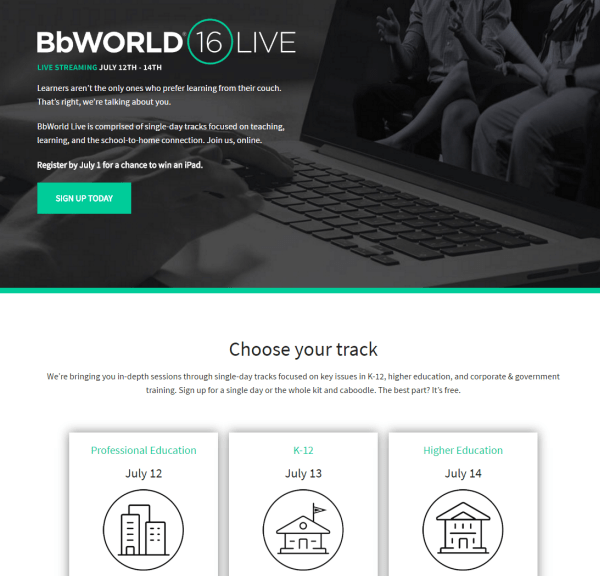
You can be a part of Blackboard World without leaving the comfort of your home sate, city, office or couch!  Yes, that’s right, you can be a part of BbWorld Live 2016.  Blackboard world will live stream sessions from the world’s largest elearning event over the course of three days!

bbworld_live

Visit the BbWorld Live website to signup for the day that lines up with your track! In the Higher Education track alone, you can choose to live stream 8 sessions!  Between every session, Blackboard will be hosting interactive Q&A with speakers, facilitating live-chats in the discussion forum, taking polls, and giving away prizes.  You can even register to win an iPad!

The catch to all of this?   There is no catch!! It is free!  So do yourself a favor, signup for BbWorld Live today, and be a part of elearning’s biggest event of the year!

Blackboard Tip – Find Courses Quickly by Customizing the “My Courses” Module

waldo_coursesIf you’ve been teaching with the Blackboard LMS for any length of time, you will know how annoying it can be to find your courses quickly when you take a look at your “My Courses” module upon logging in.  Finding your current semester course can be like a game of Where’s Waldo if you aren’t careful.

It doesn’t have to be that way! Did you know that you can streamline the “My Courses” module by sorting how the courses are arranged and limiting the amount of courses that are displayed?

Getting to the Personalize: My Courses page:

  • Place your mouse over the top right hand corner of the My Courses module header and click the gear bb_gear that appears.
    bb_mycourses_header

Customization Options:

You will be able to change the following options to streamline how your My Courses module appears:

  • Group By Term: Selecting this will allow you to organize your courses by term.
    • Show Term: Selecting this checkbox will show the term.
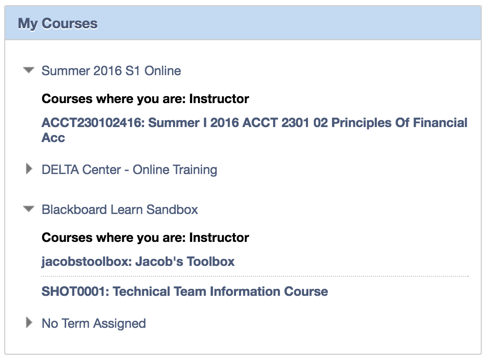
    • Expand Term: Selecting this checkbox will expand the term when displayed (Note: in the image below Summer 1 2016 S1 Online is checked and No Term Assigned is not.
  • Reorder: Click the reorder_arrowsicon to reorder your courses.  Drag the move_arrows icon to bring your courses to their new spot.
  • Course Name: Deselecting this checkbox will hide the course.
  • Course ID: This checkbox (when selected) allows for the display of the Course ID before the course name.
  • Instructors: This checkbox (when selected) will display all of the instructors for the course.
  • Announcements: This checkbox (when selected) will show course-specific announcements below the course name.
  • Tasks: When this checkbox is selected, course-specific tasks will appear below the course name.

My Courses (Customized) Preview
bb_mycoures_full

*Note: You can also link to courses you teach in other Learning Management Systems by placing the Course Name and URL in the Course # Name and URL boxes that display at the bottom of the Personalize: My Courses page.

Blog at WordPress.com.

Up ↑